2010年11月30日星期二

Microsoft’s Plan B to Make Money in Phones: Patents

Although Microsoft is still hoping that Windows Phone 7 proves to be a hit, the company doesn’t see its success as the only way to make a profit from all those millions it has poured into mobile phone technology.

At a dinner with reporters on Monday night, Microsoft top lawyer Brad Smith said that the company also sees a chance to make money from its vast pool of smartphone-related patents. He wouldn’t quantify the revenue opportunity, but conceded it doesn’t expect to be able to get as much per phone as it does when someone uses its software.

That said, the overall market opportunity from patents might still be bigger, especially when you consider Microsoft’s paltry share of the phone market today.

Smith declined to put a total dollar figure on the patent opportunity or say how much it might equate to on a per-phone basis.

“We would be hard-pressed to get more for patents than we get for software,” he said. However, Smith also agreed that the patent revenue could eventually be vastly larger than what Microsoft has made to date by licensing Windows Mobile and now Windows Phone 7.

“We’d still rather sell software,” he said, but added “either way, it gives us an opportunity to recoup [our] costs.”

At the moment, there is chaos in the phone patent arena with Apple suing HTC, Microsoft suing Motorola and Oracle suing Google, to list just a partial court docket. However, Smith said he would not be at all surprised to see things shake out in the next couple years into a manageable patent licensing arrangement, not unlike the one that exists with the radio portion of a cell phone today.

About $20 per modern phone goes to patents, with the lion’s share of that going to Qualcomm. On the smartphone side, Smith said Microsoft and Apple hold the lion’s share of the intellectual property.

“I think there is a good chance the industry will work through the patent issues over the next several years,” he said.

While Smith said he can’t speak for Apple, he said that Microsoft is actively interested in licensing its patents, noting the company’s agreement with Taiwanese cell phone maker HTC (a company that makes both Android devices, as well as those running Microsoft’s mobile operating system).

“By entering into an agreement with HTC, we effectively signaled we are open for business when it comes to licensing,” Smith said.

Smith noted that Motorola and HTC, together, account for most of the Android market. This is probably the most fertile patent ground for Microsoft, since Apple and Microsoft have a patent-swap deal that covers some technologies and also both hold a fair bit of intellectual property in the area.

The generally affable Smith was not all sunshine and rainbows, however: “If we can’t get a reasonable royalty than we will seek an injunction.”

Of course, even if the monetary impact from licensing patents for phones could rival that of selling software, it lacks the strategic benefits Microsoft gets from having its operating system on phones.

Windows Phone 7 devices not only carry Microsoft’s operating system, but also versions of Office, Bing, Zune and Xbox Live.

The computing world is increasingly shifting to one in which key software runs not just on computers, but on a panoply of mobile devices as well. Microsoft itself has talked about the notion of “three screens and a cloud,” with the phone being one of those all-important three screens.

Smith says he expects the phone patent spat to spill over into the tablet arena as well, with similar issues at stake, although he expects any royalty amount to be higher for tablets than it is for smartphones.

2010年11月29日星期一

How to put DVD movie into Windows Movie Maker and iMovie

If you want to edit a DVD movie with Windows Movie Maker or import several DVD clips into Mac iMovie to build a new DVD, but you get frustrated with the DVD format, this guide may help you solve the problem.

Before you get started, it will be helpful if you learn something about the DVD, WMM and iMovie.
General DVDs have CSS copy protection in MPEG-2 or VOB format.
(Windows) Windows Movie Maker supports WMV, AVI and MPG video files.
(Mac) iMovie accepts MOV and MPEG4 video files.

This guide includes two parts:
1. How to put DVD movie into Windows Movie Maker.
2. How to add DVD clips to Apple Mac iMovie .

Part1. How to put DVD movie into Windows Movie Maker

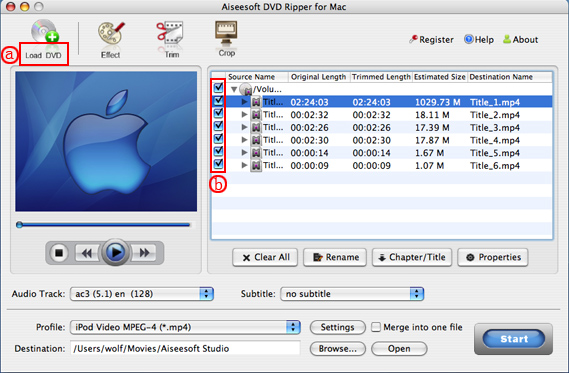
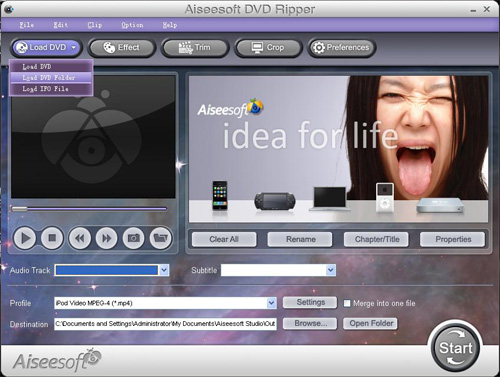
Step1. To put a DVD movie into Windows Movie Maker, you have to rip your DVD to WMV or AVI video first, and then you can load it into Windows Movie Maker. I’d prefer using Aiseesoft DVD Ripper to do this. You can get this program at: http://www.aiseesoft.com/dvd-ripper.html Then install and run it, put your DVD disc into your DVD drive, click “Load DVD” to locate your DVD file and import it, or load it by clicking “Load IFO File” to add DVD IFO file. (This DVD Ripper can rip copyright protected DVD movies, but you should remember that it’s illegal rip DVD for any business purposes)

Rip DVD with DVD Ripper for WMV

Step2. Select output format and subtitle

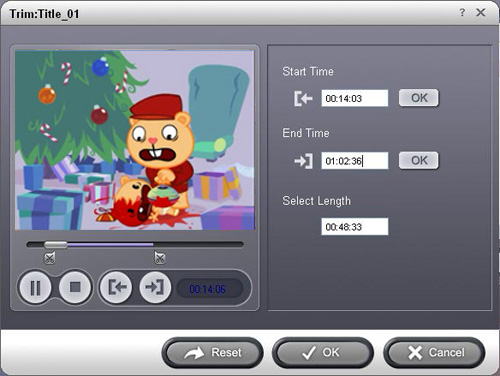
After you load the DVD files, click the format drop-down list to select “WMV – Windows Media Video (*.wmv)” or “AVI – Audio Video Interleaved (*.avi)” as the output format. A regular DVD movie has multiple subtitles and audio tracks, and you can select the right one for you. If you just want a certain part of the DVD movie, you can click “trim” to cut the DVD movie. Just drag the timeline bar to set the start and end time, and then blue line will be the captured parts.

Rip DVD into Windows Movie Maker

For advanced user, if you want to output higher quality video, click the “Settings” button to open the panel, here you can customize video bitrate, audio bitrate, resolution, framerate, etc. Higher bitrate will result in bigger file size.

Step 3. Start to convert

After the above steps, you just need to click “Start” and wait for the conversion to be finished. It provides the fastest conversion speed (>300%), completely support dual core CPU.

Step 4. Edit DVD with Windows Movie Maker (optional)

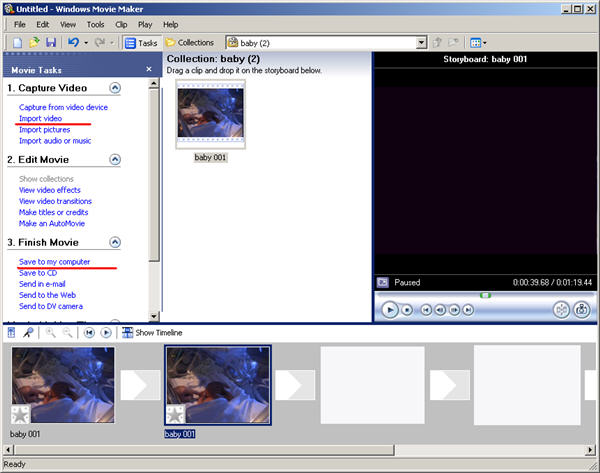
Run Windows Movie Maker, in the “Movie Task” bar, click “Add Video” to browse your computer and located the converted files, and then you can start to make personal movies.

Edit DVD with Windows Movie Maker

Tips:Many users may wonder how they can convert Windows Movie Maker file (*.MSWMM) to other video format. Actually, A *.MSWMM file is not a video file. It is a project file of Movie Maker (more like a record file). You have to open this file in Windows Movie Maker and save the movie to your computer: Go to Movie Tasks bar > Finish Movie > Save to my computer. After that you will have a WMV file which can be converted to another video format or burned to DVD.

Part2. How to add DVD clips into Apple iMovie.

iMovie is similar to Windows Movie Maker, it supports MOV and MP4 video, so you just need to convert your DVD movie to the right format. Aiseesoft DVD Ripper has a Mac Version which supports both Mac OS Tiger and Leopard; you can download it for free from here: http://www.aiseesoft.com/dvd-ripper-for-mac.html
It is easy to use for the operation steps being similar to the windows version.

put DVD into Apple iMovie

When the conversion is finished, you can run the iMovie, build a new project, and then drag the converted files to the work space to make personal files.
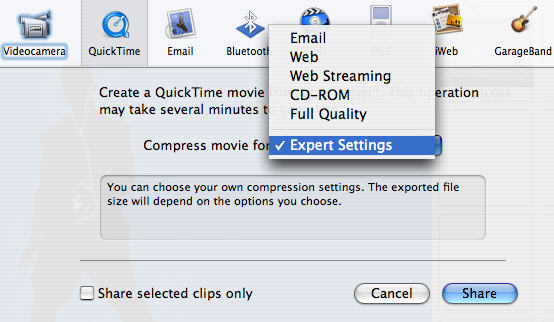
When the task is finished, In the Menu bar, Click "File" -> "Export" and save it as QuickTime video.

put DVD into Apple iMovie

Download Aiseesoft DVD Ripper for Windows (put DVD into Windows Movie Maker)
Download Aiseesoft DVD Ripper for Mac (put DVD into Apple iMovie)

2010年11月25日星期四

How to Rip DVD, Convert Video to iPhone, backup iPhone info, make iPhone Ringone For Windows/Mac

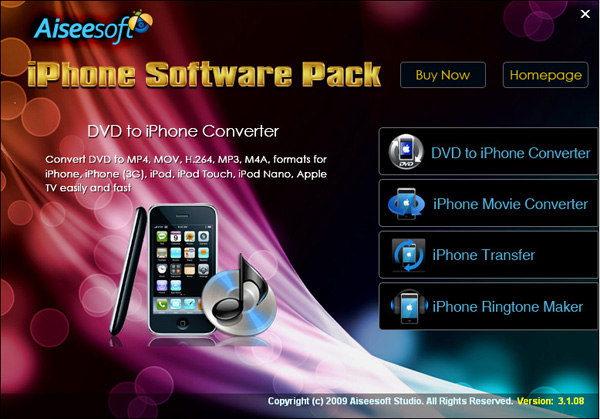
Recently, iPhone has became a really important part of our life. People use it to make a phone call, enjoy music and movies/videos, and play games. Today I will share you a really nice software pack, which can convert DVD and video to iPhone video/audio formats, backup iPhone info on your computer, and make iPhone ringtone easily.

What you need is just this nice Convert DVD Video to iPhone software

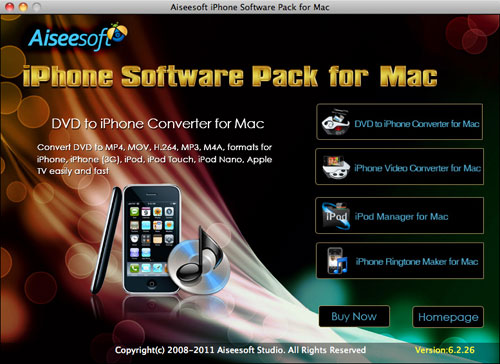
iPhone Software Pack

Part 1: How to convert DVD movies to iPhone
Use Aiseesoft DVD to iPhone Converter.

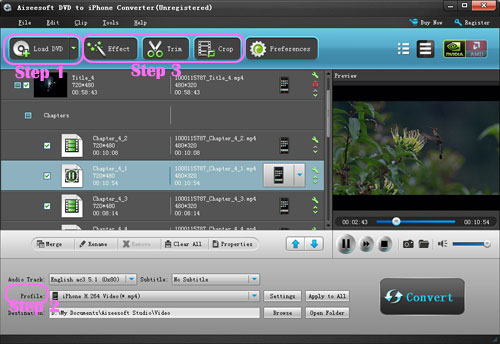
DVD to iPhone Converter

Step 1: Load DVD
Put your DVD in your DVD Drive and click “Load DVD” button

Step 2: Choose output profile and Settings
You can choose your output profile in the drop-list when you click profile list.
You can also adjust your settings, such as Resolution, Bitrate, so on.

Step 3: Edit Video
You can do “Trim”, “Crop”, “Merge into one file”and other video editing functions to make your video more enjoyable.

Click “Start” to begin you conversion. After few mins you can enjoy your DVD movies on your iPhone.

Part 2: How to convert videos to iPhone with iPhone Movie Converter

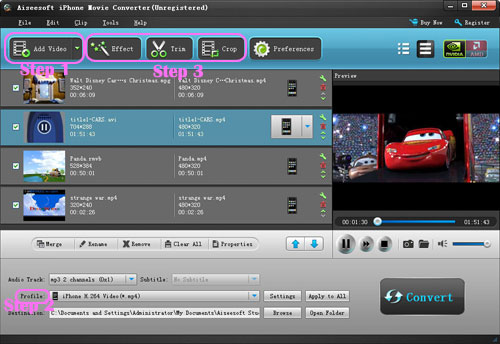
iPhone Movie Converter

Step 1: Add file
Click “Add File” button to add your video you want to put on your iPhone.

Step 2: Choose output profile and settings
You can choose your output profile in the drop-list when you click profile list.
You can also adjust your settings, such as Resolution, Bitrate and Encoder and so on.

Step 3: Edit Video
You can do “Trim”, “Crop”, “Merge into one file”and other video editing functions to make your video more enjoyable.

Click “Start” to begin you conversion. After few mins you can enjoy your videos on your iPhone.

Part 3: How to transfer songs and vdieos from iPhone to computer, from computer to iPhone and from iPhone to iPhone.

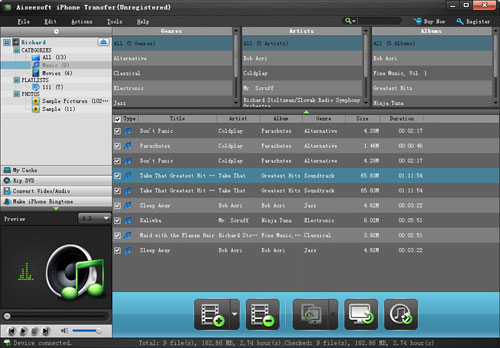
iPhone Transfer

Step 1: Click iPhone Transfer
Click “Computer to iPhone”(1) button, it will allow you to transfer songs and videos from your computer to iPhone easily.
Click “iPhone to Computer”(2) button, it will allow you to backup your songs and videos from iPhone to your computer.
Click “iPhone to iPhone”(3) button, it will allow you to transfer songs and videos from one iPhone to another iPhone dirrectly.

Part 4: How to make your own iPhone ringtone

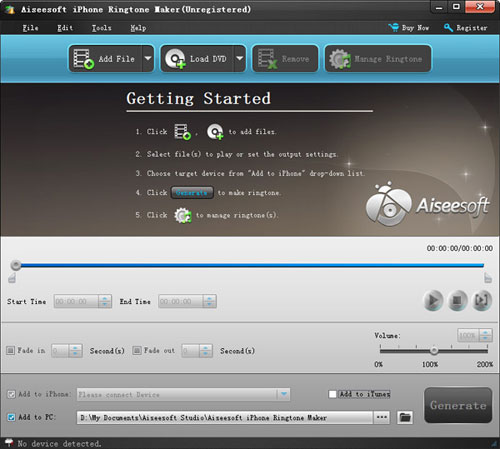
iPhone Ringtone Maker

Step 1: Click iPhone Rigntone Maker and click “Browse” on the right side of "Input File" to import the file that you want to make ringtone from i.t

Step 2: Play it and listen the music to find the segment that you want to use it as ringtone. Then drag and click the start& end slider to set your wanted segment, or type the start & end time in the corresponding text box directly to get the exact segment. You also can pre-listen the converted audio before generate.

Step 3: Click “Browse” on the right side of "Local Output Folder" to choose the output destination.

Step 4: Check "Export to iPhone" option, the converted ringtone will be load to your iPhone directly.

Step 5: After all the settings are finished, click “Generate” to begin making your own iPhone ringtone.

For Mac users I recommend you Aiseesoft iPhone Software Pack for Mac

Using Aiseesoft iPhone Software Pack for Mac, you can convert any video/DVD to iPhone Mac, backup the audio, video files on iPod to Mac and import audio, video files or folders from Mac to your iPod with the help of iPod Manager Mac, even make iPhone ringtone from AVI, MPEG, WMV, MP4, FLV, MKV, H.264/MPEG-4, DivX, XviD, MOV, RM, RMVB, MP3, WMA, AAC video and audio sources on Mac.

iPhone Software Pack for Mac

2010年11月24日星期三

How to use Techspansion's open source to build iSquint and VisualHub

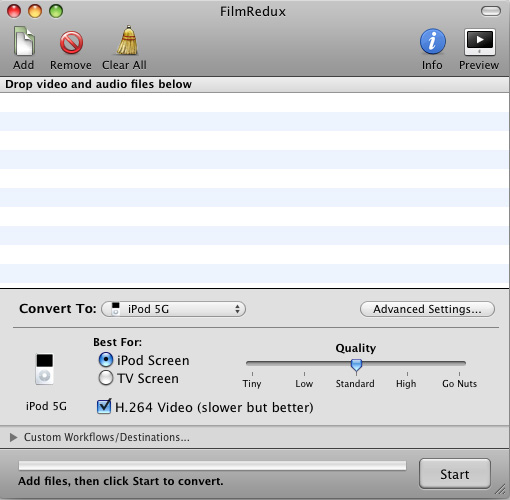
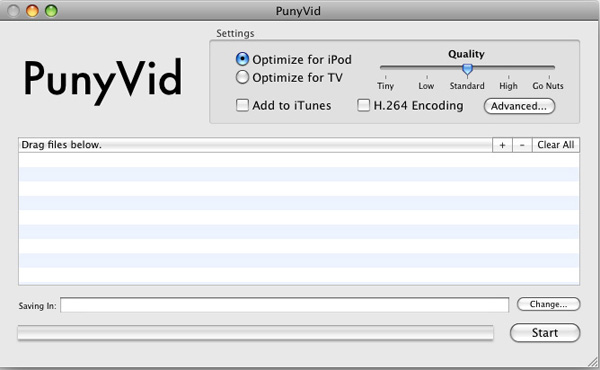
Squint and VisualHub, the popular video converter on Mac OS X have now gone open source. They also have got new names, Film Redux (VisualHub) and PunyVid (iSquint). As you may or may not know, the developer, Techspanion has closed shop
and after an outcry from fans, it has released the source code.
You can get them here: SourceForge.net Repository - [transcoderredux] Index of /
This a tutorial on how to use Techspansion's open source to build iSquint and VisualHub.

Here are two parts:
Part 1, How to use open source to build VisualHub (Film Redux)?
Part 2, How to use open source to build iSquint (PunyVid).

What you need:
Mac OS X 10.5, Xcode 3.0 and Techspansion's open source

Part 1, How to use open source to build VisualHub (Film Redux)?
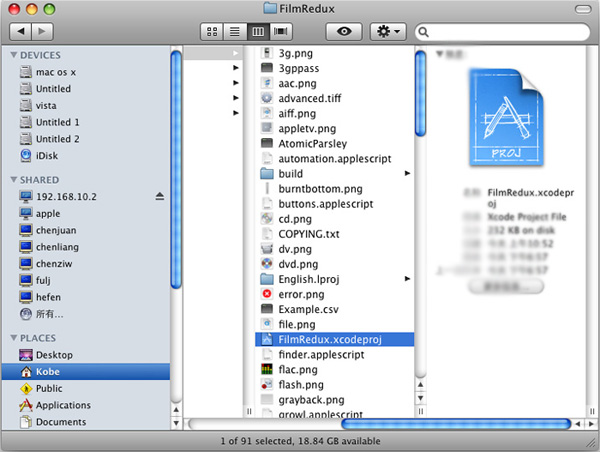
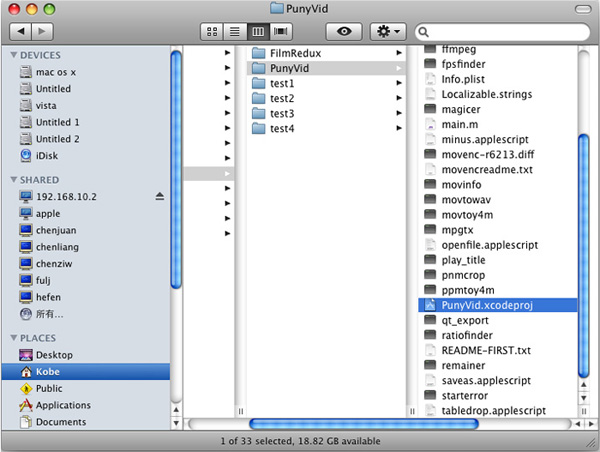
Step 1, Open the open source, you will see two folders: FilmRedux and PunyVid. Open FilmRedux and find the file "FilmRedux.xcodeproj".

FilmRedux and PunyVid

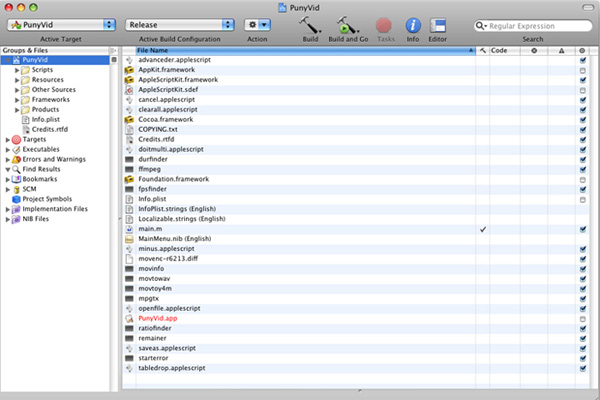
Step 2, Double click "FilmRedux.xcodeproj" to open it with Xcode.

open source

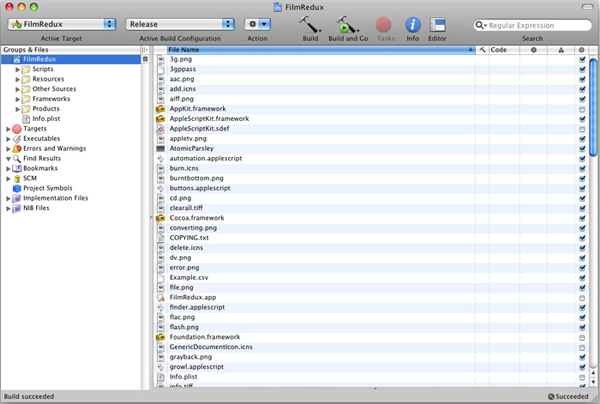
Step 3, Click the button "Build and Go" to build VisualHub (Film Redux). That's all.

build VisualHub

Part 2, How to use open source to build iSquint( PunyVid)?
Step 1, Open the open source, you will see two folders: FilmRedux and PunyVid. Open PunyVid and find the file "PunyVid.xcodeproj".

open source

Step 2, Double click "PunyVid.xcodeproj" to open it with Xcode.

open source

Step 3, Click the button "Build and Go" to build iSquint (PunyVid). That's all.

 build iSquint

The operation is simple, but the stability would be a great concern, it kept reporting error messages during my try which is really frustrated. Perhaps it's not wise enough to spend hours coping with those errors messages, as there must be some commercial programs that perform much more reliably, like the Video Converter for Mac.
If you want to convert videos to DVD, here is DVD Creator for Mac.

Hollywood’s Big Hope: Google Shows Up With Suitcase Full of Money. It Could Happen!

Here’s a script Hollywood has been pitching for some time: Google comes to town with a checkbook in hand.

It hasn’t happened yet, but the longer the company struggles to break into the market for “premium full-length content”–movies and TV shows–the more you hear studio types talking it up. And maybe Google is listening!

The New York Post reports that the search giant is in talks to buy the digital rights to Miramax’s movies; Disney is about to sell the studio off to Filmyard Holdings.

The supposed deal makes plenty of sense on paper: Google finally gets its hands on movies people want to see–”No Country for Old Men,” “Pulp Fiction,” a lot of very earnest indie films from the mid-’90s, etc.–and Filmyard gets an instant cash infusion to help defray the cost of its acquisition.

To date, Google has struggled to get the big studios to let it put their content up–for free or for rent–which is why many Hollywood types have suggested that the company simply purchase a “Google window,” by buying a studio or a piece of a studio.

You can see why Hollywood would be pushing for a deep-pocketed suitor to show up. And you can see why Google has been resistant to that idea: If it starts writing checks to Hollywood, then every content player, everywhere, will expect the same thing. And Google has always insisted that it’s not in the content business, period.

But that’s getting harder and harder to believe, as the company spends more and more time trying to beef up its media offerings (see, for instance: Google Music, if it shows up).

Meanwhile, the ability and willingess to write big checks is directly connected to the Netflix Web success story: So far Reed Hastings and company have racked up a billion-dollar-plus bill for digital content rights, and that number is going to keep climbing.

Which is why it’s significant that Google hired Netflix executive Robert Kyncl to hammer out Hollywood content deals earlier this year. A big-dollar Miramax deal would indicate that he’s working from the same playbook he used at his last gig.

2010年11月22日星期一

Google Pushing Chrome So Hard It’s Buying…Print Ads?

Google has so much money and is so intent on pushing its Chrome browser that it’s willing to put marketing dollars into the weirdest places.

Like a print newspaper.

Search Engine Land’s Danny Sullivan was flipping through the Sunday edition of the Los Angeles Times yesterday and stumbled into this Chrome ad (click image to enlarge). It’s a reference to Google’s head-scratching “Things I Learned About Browsers” e-book.

This is the part of the post where I’m supposed to point out how ridiculous it is for a Web company to advertise anything at all in offline media. And how especially ridiculous it is for someone to advertise a browser in a newspaper.

But then again: It worked!

(Almost as surprising: Search guru Danny Sullivan routinely reads the print version of the LA Times!)

Looks Like Facebook Connect Is Coming to Myspace Tomorrow

Myspace and Facebook have just invited the press to a joint GoToMeeting webinar (how very not social media!) tomorrow at noon PT. The announcement comes on the heels of a report from the Telegraph on Wednesday that Myspace plans to integrate Facebook Connect “imminently.” Plus, Myspace recently (and perhaps accidentally) introduced a “login with Facebook” option on its sign-up page that was non-functional, as Inside Facebook noticed.

Facebook VP Dan Rose

Presenting at the webinar will be Myspace CEO Mike Jones–who has been pitching Myspace as “a social entertainment destination” rather than a social network–and Dan Rose, VP of Partnerships and Platform Marketing for Facebook.

Myspace adding Facebook Connect has been rumored for so long you’d think it had already happened, so hopefully there will be more to the deal than that.

If things go as heralded, this will be the first Facebook announcement in a long time where CEO Mark Zuckerberg has not spoken for the company. Dan Rose is a former Amazon guy who joined Facebook in 2006. He has recently spoken on Facebook’s behalf about a partnership with Microsoft’s Bing to give it social data to improve search, and EA’s five-year exclusive Facebook Credits deal. Rose was previously Facebook’s VP of business development and monetization, and according to Kara Swisher was the main negotiator in Facebook’s failed effort to buy Twitter a couple of years ago.

2010年11月21日星期日

How to use Mac TS converter to convert TS to MP4, MOV, etc on Mac OS X

What is TS?
Transport stream(TS, TP, MPEG-TS, or M2T) is a communications protocol for audio, video, and data which is specified in MPEG-2 Part 1, Systems (ISO/IEC standard 13818-1). Its design goal is to allow multiplexing of digital video and audio and to synchronize the output. Transport stream offers features for error correction for transportation over unreliable media, and is used in broadcast applications such as DVB and ATSC. It is contrasted with program stream, designed for more reliable media such as DVDs.
TS format is a container format that encapsulates pocketsize elementary streams and other data.
Important elements of a transport stream: Packet, PID, Programs, Program Specific Information (PSI) , 1 PAT , PMT , PCR , Null packets

How to play TS files on Mac?
You need media player to play TS files on Mac OS X:
VLC media player is a highly portable multimedia player for various audio and video formats (MPEG-1, MPEG-2, MPEG-4, DivX, mp3, ogg, ...) as well as DVDs, VCDs, and various streaming protocols. It can also be used as a server to stream in unicast or multicast in IPv4 or IPv6 on a high-bandwidth network. It supports Mac, linux, Windows.
How to convert TS to MP4, AVI,MOV, etc on Mac?
You need a video converter for Mac to convert TS to MP4, AVI, MOV, etc on Mac. Then you can put them on iPod, iPhone, PSP, Xbox 360, iMove, other potable players.
Step 1: Download TS Video Converter for Mac:
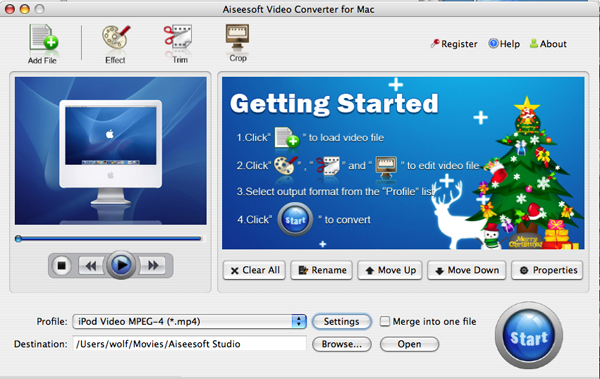
We recommend you Aiseesoft Video Converter for Mac which can convert TS to MP4, Convert TS to AVI perfectly. This Mac TS Video Converter also can extract audio from TS and Convert to MP3, M4A, etc. Compared with other video converters, this TS video converter for Mac provides you with better output quality, more advanced functions and higher conversion speed. You can download free trial Version here: for Mac intel users, for Mac PowerPC users. Then install and run this program. The trial version should be fully functional for what you want to do.
Step 2: Load the TS files you want to convert

Video Converter for Mac

Click the "Add File" button to browse your computer hard disc and add the .TS files you want to convert to the program.
Step 3: Output Settings
After you added TS files, you can select an output format for each video file and specify a directory on your computer to save the output files.
The TS Converter for Mac supports comprehensive video formats including AVI, MPEG, WMV, MP4, XviD, 3GP, FLV, etc.
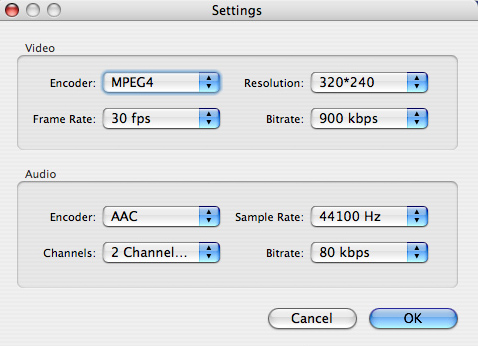
If you don't know what formats your device supports, you can just select the format according to the device name. Of course, if you don't want to use the default video and audio encoding settings, just click the "Settings" button to customize these settings.

Video Converter for Mac - settings

Step 4: Edit your TS files
This TS Video Converter for Mac set video brightness, contrast, saturation, crop video, trim video/audio and even merge multiple files into one file.

Step 5: Start the conversion
Click the Convert button to start conversion and then you can just go out for a walk or take a nap, and the conversion may have been finished when you come back: )

Modifications of transport stream specification for random-access media (M2TS)
Transport Stream was designed for tape and broadcast, but it required modifications for usage with random-access media devices like new generation of digital camcorders that record onto DVD disks, hard drives or solid-state memory cards.
Random-access based systems may save data packets into a temporary buffer if a storage device is not ready, for example on device startup. Packets are written out of order, and to keep track of them, a 4-byte timecode (TC) is added to standard 188-byte packets. The result is a 192-byte packet. This is what is informally called M2TS stream. Sony calls it "BDAV MPEG-2 transport stream". JVC calls it TOD (possibly an abbreviation for "Transport stream on media") when used in HDD-based camcorders like GZ-HD7.[9] M2TS transport stream is also used for AVCHD video files, which often have MTS extension.

2010年11月19日星期五

Enter the Chernin? Former News Corp. President and COO in Yahoo What-If Mix

Things have certainly quieted down in the swirl of mostly vapor plots about the future of Yahoo, although the pondering, machinating and such on the parts of a variety of players have most certainly continued.

And that includes the introduction of a new character into the drama: Former News Corp. President Peter Chernin.

Let’s be very clear–there is no active plan for Chernin to join Yahoo or its board, nor is he currently part of any possible takeover plan related to the Silicon Valley Internet giant.

But multiple sources from a variety of sides said that Chernin, a well-liked and deeply experienced media and entertainment exec, has been contacted by a number of private equity firms and other investors about his interest in becoming involved should any of the various and sundry scenarios around the Internet giant pan out.

And Chernin, many sources said, has expressed a definite interest in the situation, perhaps because he was deeply involved in a previous deal when running News Corp.

At the time, it involved combining the media giant’s Myspace social networking site with Yahoo and also Microsoft’s portal MSN and creating a new company, code-named “TrafficCo.”

“He is asking a lot of questions and is nosing around, but there is not a plan,” said one source. “Yahoo has always been an interesting opportunity to him.”

Indeed, especially since Chernin has had a longtime interest in being more involved in digital business after a long career in traditional media.

He currently has a Santa Monica, Calif.-based media company, called Chernin Entertainment, which has a lucrative first-look production film and television deal with News Corp.–as well as the Chernin Group, which “pursues strategic opportunities in media, technology, and entertainment.”

And, in recent weeks, Chernin (pictured here) has also unveiled a new media venture in Asia called CA Media, which will “focus on a broad range of opportunities in content creation (specifically, film and TV production), television networks, sports, education, advertising, and digital media.”

But so far, since he left News Corp. in early 2009, Chernin has done very little in the digital arena.

In contrast, at News Corp., he was a key exec behind its co-founding of the Hulu premium video site, for example, among other digital initiatives.

And when Microsoft was vying to acquire Yahoo several years ago, Chernin and News Corp. CEO and Chairman Rupert Murdoch were actively trying to forge some solution that involved the company.

One possibility floated by numerous sources was that Chernin could once again work with Microsoft on settling all the turmoil around Yahoo of late.

In a related matter, sources said he had been in very early talks with the company about doing a subscription original-content channel on its Xbox–a kind of digital-only HBO–aimed at young men. Those discussions have not resulted in any project.

And, in fact, Chernin was a guest speaker at a Microsoft board retreat just yesterday in the Seattle area, where the theme was “Three Screens.”

He reportedly addressed television, the other two screen being the computer and the mobile phone.

A tighter relationship between Chernin and Microsoft would be interesting and possibly helpful to both.

“Microsoft is very worried about making sure there is a stable Yahoo,” said a source close to the situation, who noted the software giant has been quietly eyeing the situation and considering options. “Involving a well-regarded executive like Chernin makes a lot of sense.”

That makes sense given the key online search and advertising partnership Microsoft and Yahoo are now in, which tightly ties their fates together.

Of course, much about the Yahoo situation and any scenario being thought of–from spinning off its Asian assets in China’s Alibaba Group and Yahoo Japan, to taking it private, to replacing its management and board–is, as BoomTown has frequently noted, a lot of shadows and dust at this point.

But–as a longtime admirer of Chernin’s curiosity about the digital realm, refreshingly minus the requisite horror over its growth that is so characteristic of much of Hollywood–his interest is a welcome one into the debate over what Yahoo needs to do to reinvigorate itself going forward.

Asking his thoughts might be a good question at the Web 2.0 Summit conference, where Chernin is being interviewed later today on the topic of content.

2010年11月16日星期二

How to fix error while burning DVD with iDVD

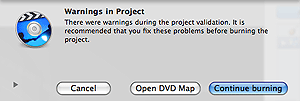
If you found message warning while click “Burn” in iDVD program. As same as pictures below:

iDVD error

Following these steps, you can fix the error:
1. Message warning click “Open DVD Map”.
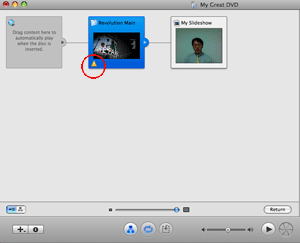
2. New window will display. Find out yellow triangle and “!” inside.

iDVD error - yellow triangle

3. Correct any mistake and then try to burn again.

2010年11月15日星期一

EMC to Buy Isilon Systems

Another acquisition for EMC. The data storage technology supplier, which over the past five years has spent some $7 billion buying other companies, is reaching for its wallet once again. This morning, EMC announced plans to purchase Isilon Systems. Price: $33.85 a share in cash, or roughly $2.25 billion.

For EMC, the acquisition of Isilon gives it a stake in the network-attached storage space, a fast-growing market for “big data” storage (think movie studio catalogs and gene sequencing information) currently dominated by the likes of NetApp and the site of some other big acquisitions this year–Hewlett-Packard’s purchase of 3Par for $2.4 billion, for example. “The unmistakable waves of cloud computing and ‘big data’ are upon us,” EMC CEO Joe Tucci said in a statement. “Customers are looking for new ways to store, protect, secure and add intelligence to the vast amounts of information they will accumulate over the next decade.”

How to use Techspansion's open source to build iSquint and VisualHub

Squint and VisualHub, the popular video converter on Mac OS X have now gone open source. They also have got new names, Film Redux (VisualHub) and PunyVid (iSquint). As you may or may not know, the developer, Techspanion has closed shop
and after an outcry from fans, it has released the source code.
You can get them here: SourceForge.net Repository - [transcoderredux] Index of /
This a tutorial on how to use Techspansion's open source to build iSquint and VisualHub.

Here are two parts:
Part 1, How to use open source to build VisualHub (Film Redux)?
Part 2, How to use open source to build iSquint (PunyVid).

What you need:
Mac OS X 10.5, Xcode 3.0 and Techspansion's open source

Part 1, How to use open source to build VisualHub (Film Redux)?
Step 1, Open the open source, you will see two folders: FilmRedux and PunyVid. Open FilmRedux and find the file "FilmRedux.xcodeproj".

FilmRedux and PunyVid

Step 2, Double click "FilmRedux.xcodeproj" to open it with Xcode.

open source

Step 3, Click the button "Build and Go" to build VisualHub (Film Redux). That's all.

build VisualHub

Part 2, How to use open source to build iSquint( PunyVid)?
Step 1, Open the open source, you will see two folders: FilmRedux and PunyVid. Open PunyVid and find the file "PunyVid.xcodeproj".

open source

Step 2, Double click "PunyVid.xcodeproj" to open it with Xcode.

open source

Step 3, Click the button "Build and Go" to build iSquint (PunyVid). That's all.

 build iSquint

The operation is simple, but the stability would be a great concern, it kept reporting error messages during my try which is really frustrated. Perhaps it's not wise enough to spend hours coping with those errors messages, as there must be some commercial programs that perform much more reliably, like the Video Converter for Mac.
If you want to convert videos to DVD, here is DVD Creator for Mac.

2010年11月14日星期日

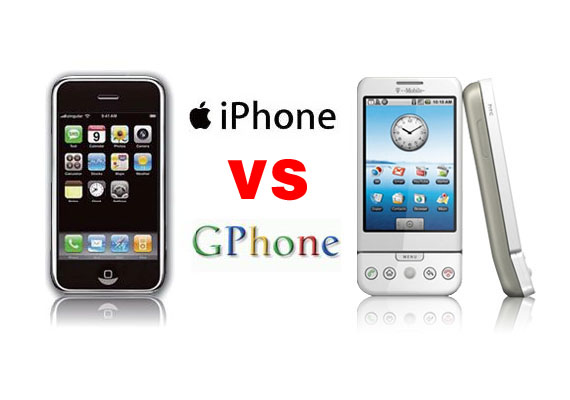
Gphone vs iPhone, which is better?

As iPhone is the most talked about smart phone on the planet and it has won millions of hearts of users by his multi-touch screen and other powerful/beautiful design. Of course, iPhone has brought so much money for Apple.
On 23rd, Sep 2008 Google released G1 and claimed that they will have a share of the big market of smart phone.
So, which is better about iPhone and G1? That maybe asked by many people who want to buy a new phone. Here I will give some of opinion about G1 and iPhone.
I will compare these two phones in three aspects, hardware, software, and their performance as a media player.

Gphone vs iPhone

Part 1: Hardware.

1. The price and storage memory
First, the price and storage memory is what I concern most, for iPhone $199 8GB, $299 16GB, for G1 $179 1GB. When you see this you will say G1 is $20 lower than iPhone but G1 is only 1GB and you will pay another $40 for an 8GB SD Card. So I think iPhone win in this round.

2. Appearance
iPhone is 133 grams/4.7 ounces and G1 is 158 grams/5.57 ounces. G1 is taller while iPhone is thinner (G1: 117.7*55.7*17.1, iPhone: 115.5*62.1*12.3).

3. Mobile Network
For mobile Network, they both have Quad Band GSM/EDGE UMTS, but G1 uses T-Mobile-only US 3G and iPhone uses AT&T-only US 3G.

4. Touch screen and input
About touch screen display, iPhone has Multi-touch 3.5 480*320 163 ppi, but G1 does not support mulit-touch. And in input aspect, G1 uses keyboard, Trackball, 6 buttons and touch screen, while iPhone has home button and multi touch screen.

5. Expansion
In expansion ports, G1 uses SD, ExtUSB(USB+audio) but iPhone has headphone, Dock connector (USB+ audio, video, remote). They have the same wireless WiFi 820.11b/g Limited Bluetooth 2.0 EDR.

6. Others
About hardware, the two phones perform almost the same and the only big difference is the iPhone uses multi-touch screen and G1’s camera is better than iPhone. And iPhone has a 1400Ah battery with 300 hours standby time but G1 only has a 1150Ah battery with 5 hours talk time and 130 standby.

Part 2: Software.

iPhone and G1 are both using Webkit as their browser engine. In media playback aspect, iPhone supports music, audiobook, video, streaming, downloads and rental, while for G1, only music playback. G1 has Android Market as its third party software store while iPhone has iPhone app store. G1’s platform is Modified Java development and iPhone uses Cocoa Touch.

Part 3: Their performance as media player.

G1 supports H.264, 3GPP, MPEG4, Codec 3GP video and MP3、AAC、AAC+、WMA、MPEG4、WAV、MIDI、REAL、AUDIO、OGG audio formats.
iPhone supports AAC,Protected AAC,MP3,MP3 VBR,Audible (formats 1, 2, 3), Apple Lossless, AIFF, WAV audio formats and H.264 (up to 1.5Mbps), MPEG-4 (up to 2.5Mbps) 640*480, 30fps, AAC-LC (up to 160 Kbps), 48kHz dimensional sound .m4v, .mp4 and .mov format.

Amazon MP3 Store allows you to download 6 million songs without the DRM protection, 89 cents per song. It is similar with the Apple iPhone, you need to pay for the video and audio sources on the Apple store. But how to get free sources for your G1.

For iPhone and G1 you can buy songs and videos from store, which is really expensive, and you can also make songs and videos for your iPhone and G1 by yourself, you just need to convert your DVDs and videos to mp4 format and then you can put them easily to your iPhone and G1.

Here I recommend you Aiseesoft DVD Converter Suite, it includes Best DVD Ripper, Total Video Converter and iPod to Computer Transfer.
For Mac user, I recommend you Aiseesoft DVD Converter Suite for Mac, it includes DVD Ripper for Mac and Total Video Converter for Mac.

2010年11月11日星期四

How to copy DVD to ISO file for Mac

ISO file is an unattached file format (like RAR and ZIP): it merges a series of files into one single file according to a definite format. So they are stored in an uncompressed format., then it is more practicable to to transfer it over the Internet or via a LAN connection.

There lists the capabilities of DVD Copy for Mac on ISO file:
Copy: the ability to copy DVD to ISO file for Mac.
Burn: the ability to burn ISO file to an optical Disc.
Extract: the ability to copy the content of ISO file to a hard disc.

Free download this DVD Copy for Mac to have a try!

Buy NowFree trial(Intel PPC)

Let’s take the example: How to copy DVD to ISO file for Mac

Click “Full Disc ” button or “Main Movie Mode” button on the main interface to select the copy DVD mode.

Select the source: Select the DVD-video disc here to copy your DVD file.

Choose the target: Choose the ISO image target here for copying your DVD files as ISO file.

Start to Copy:Click the “Start” to begin your DVD copying to ISO file on Mac.

learn more on: how to edit DVD file or ISO file with DVD Copy for Mac.

2010年11月10日星期三

SAP Attorney: Board Knew TomorrowNow Was Infringing at Time of Acquisition

Proceedings in the Oracle-SAP trial kicked off today with a comment, startling in both its source and content.

While discussing instructions to be given to the jury before it begins deliberations, SAP attorney Greg Lanier remarked that “at time of acquisition, the board was aware of [infringing] software on TomorrowNow’s computers.”

The jury wasn’t present to hear Lanier’s admission, but still it seems a rather bold one to make in open court, considering SAPs’ stance up until today–even when it decided in October not to contest Oracle’s claim for contributory infringement–has been that its executives didn’t know its TomorrowNow unit was illegally pillaging Oracle’s IP.

SAP declined comment on Lanier’s remarks.

PREVIOUSLY:

2010年11月8日星期一

Oracle-SAP Trial: Ellison Swaps Katana for Poison Darts

If Oracle CEO Larry Ellison’s testimony today in the SAP trial lacked his usual flair for enthusiastic bloodletting, it was only because he put aside his standard samurai tactics in favor of a more subtle ninja approach.

On the stand in an Oakland, Calif., courtroom today, Ellison was such a picture of moderation and restraint that you almost wondered if his handlers had shot him up before his appearance–like sedating a dog for air travel. As one SAP rep told me, Ellison “was anti-climatic given his vituperative statements of the last weeks.”

Which is true. But his testimony was still quite damning–to my ears anyway. For one thing, he said that Oracle could have charged SAP $4 billion to license the programs that its TomorrowNow subsidiary wrongfully downloaded. For another, he said Oracle would have had trouble paying its employees if it allowed its rivals unfettered access to the software and support libraries at issue in this case.

“I’m not sure we would go out of business but pretty close to going out of business,” Ellison said during questioning by attorney David Boies. “If they could get that software for nothing, we’d have a hard time paying 100,000 employees.”

If that was the case, then why didn’t Oracle make a bigger stink over SAP’s acquisition of TomorrowNow when it was first announced? SAP’s legal team was quick to pick up on this and hammered Ellison, claiming there’s “not a shred of documented evidence” demonstrating Oracle’s concerns. But they didn’t get much of anywhere with that because it turned out there is some.

“When SAP announced the TomorrowNow acquisition,” Ellison said, “I made a public statement….I thought they might cheat around the edges in terms of our copyrights…and I publicly warned them that while they have every right to support our software, they have to respect our intellectual property–[they] can’t just redistribute it without paying for it.”

And, indeed, Ellison did do this during the company’s 2005 analyst day. “SAP has every right to provide support for PeopleSoft applications as long as they don’t violate our intellectual and contractual property rights,” he said. “It might make it awkward for them. That’s our intellectual property, and they should be cautious.”

Driving those remarks was Ellison’s fear at the time that with TomorrowNow, SAP might do Oracle real harm. “I thought this was a major program with a huge potential to do severe damage to Oracle,” Ellison said today, adding that his vision of how SAP planned to go about it wasn’t quite how things played out. “It was a brilliant idea to take our customers, but to execute it properly they had to go out and hire hundreds, if not thousands, of engineers to maintain PeopleSoft and JD Edwards and Siebel. That was going to be expensive. I certainly didn’t think they would simply take our intellectual property and then resell it to their own customers. I never thought that could happen.”

SAP’s attorney, Tharan Lanier, challenged Ellison on these points as well, suggesting Oracle is exaggerating when it claims that TomorrowNow’s infringement jeopardized as much as 20 to 30 percent of Oracle’s customers from its acquisition of PeopleSoft and 10 percent of those from the later acquisition of Siebel Systems. And in the end, Ellison conceded that only about 350 customers were lost as a result of TomorrowNow’s infringement. But he also managed to again suggest that potential losses were far, far greater.

“I think taking our intellectual property is a two-edged sword,” he said. “For [SAP] it means they have access to all our engineering output. They have regulatory updates at the same moment we have them. They have new versions of our software at the same time we have them. They have bug fixes at the same time we have them. So they should be able to provide the same quality of support that we’re providing except that they’re doing it at a very low cost, while Oracle bears the cost of all that engineering.”

The other side of that sword is running an irrational risk by taking our software. That’s a risk I certainly would never, ever undertake.”

PREVIOUSLY:

Mobile Phone Kits to Diagnose STDs

Mobile phones and computers will soon be able to diagnose sexually transmitted diseases under innovative plans to cut the UK’s rising rate of herpes, chlamydia and gonorrhoea among young people.

Doctors and technology experts are developing small devices, similar to pregnancy testing kits, that will tell someone quickly and privately if they have caught an infection through sexual contact.

Read the rest of this post on the original site

2010年11月7日星期日

How to Watch Free, Live Broadcast TV on Your iPad, Right Now

The broadcast networks only put their stuff on the Web under very specific conditions. So this is exactly what they don’t want: Free, live streams of their stuff delivered to your iPad, via the browser.

You can get it right now, by heading to FilmOn.com, where you can get streams of several local L.A. TV stations, which means you can get whatever NBC, ABC, CBS and Fox are broadcasting. You can also get a few cable channels, like Time Warner’s CNN International, as well as a couple of porn feeds.

It’s incredibly easy, and it’s a very high-quality feed, with very little lag. This screenshot of NBC’s “Today Show” isn’t very exciting, but it is current–I took it a few minutes ago.

You can also get FilmOn via a conventional PC, but that requires a download, so it’s not quite as convenient. But it’s still very easy, and while FilmOn has said it would charge for the service, it’s free for now.

How is this possible? It shouldn’t be, according to the networks, who are suing FilmOn and founder Alki David. They’re also suing ivi.TV, which is doing something similar with feeds from Seattle TV stations.

Both FilmOn and ivi are arguing that they’re within their rights based on an interpretation of FCC rules that allow “secondary transmissions” of broadcast signals.

The networks, of course, will work very, very hard to shoot down that argument, for obvious reasons. Ivi and FilmOn have been out for several weeks, but a note from industry analyst Rich Greenfield (registration required) this morning is going to increase the attention the two companies have been getting.

Meanwhile, it will be interesting to see how Apple plays this. Steve Jobs has big plans for the TV business, but they generally involve working with the networks and studios so that they can charge money for their shows on his devices.

On the other hand, since FilmOn is getting to the iPad over the free Web, instead of an Apple-approved app, I’m not sure how Jobs could stop the transmission. Even if he wants to.

UPDATE: Ivi’s Hal Bringman wants us to know that in addition to Seattle, his service also offers streams from New York broadcast stations, and will start offering from L.A. this weekend. Up next–Chicago and Philadelphia. Bringman says his company also has an iPad app in the works, but that one will require a $4.95 monthly fee.

2010年11月4日星期四

FTC Gives Ed Felten Freedom to Tinker

Looks like the Federal Trade Commission got its first choice of Chief Technologist, because it’s hard to think of anyone better to serve in that capacity than Princeton computer science professor Ed Felten, a guy whose CV makes everyone from Microsoft to Diebold shudder in embarrassment. A renowned computer researcher, Felten has over the years led charges against some of technology’s most ill-starred concepts, chronicling them in his widely read Freedom to Tinker blog.

In 2000, his team dropped the hammer on the Hack SDMI challenge by demonstrating how easy it was to crack the decidedly mediocre Secure Digital Music Initiative.

Dragged into the Sony BMG CD copy-protection scandal in 2005, he discovered that Sony’s “fix” for the Digital Rights Management rootkit it used to protect some new music CDs furthered inflamed an already bad situation.

And then, of course, there were Felten’s various investigations into electronic voting machines, the most notorious being the one that revealed Diebold’s machines could be opened with a standard office furniture key. “The access panel door on a Diebold AccuVote-TS voting machine–the door that protects the memory card that stores the votes, and is the main barrier to the injection of a virus–can be opened with a standard key that is widely available on the Internet,” Felten wrote at the time. “The exact same key is used widely in office furniture, electronic equipment, jukeboxes, and hotel minibars.”

Thank God for Felten, right?

And thank God the FTC has seen fit to hire him. There’s a lot of good he can do there. As Felten described it, “My main job will be to advise the FTC leadership on technology policy issues. My goals are use my technical expertise and knowledge of the tech world to help the FTC make the best decisions on tech topics, and to contribute to building up the agency’s technical capabilities.”

Said FTC Chairman Jon Leibowitz, “Ed is extraordinarily respected in the technology community, and his background and knowledge make him an outstanding choice to serve as the agency’s first Chief Technologist. He’s going to add unparalleled expertise on high-technology markets and computer security.”

2010年11月2日星期二

The iPod Family(Part 1)

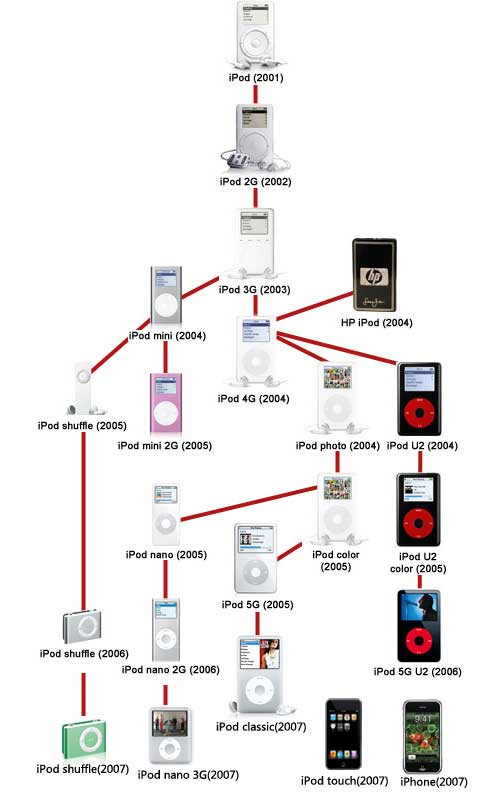
We're hard pressed to say the iPod family's fallen on particularly hard times, but being under such excruciating public scrutiny can take its toll on any dynasty; especially in a year like 2005, the family shaken to its core by so many tragic deaths. From the humble beginnings of the iPod that began the legacy so many years back, all the way up to the tragic loss of the iPod mini just yesterday, we felt it might be time to take a visit to the iPod family cemetary on this early autumn afternoon.

iPod Family
iPod family Tree

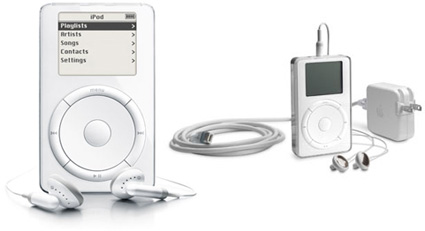
2001

first generation iPod
The first generation iPod-October 2001 - July 2002

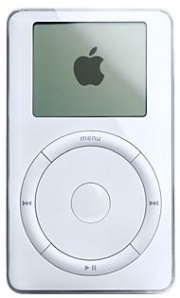
2002
second generation iPod
The second generation iPod-July 2002 - April 2003
But a few mournful months after the passing of the 5GB iPod and the birth of the 10GB iPod, came a new 10GB iPod and the 20GB, which started at $499. Perhaps one of the least well-remembered of the iPod family, this iPod included the first non-mechanical (solid state) scroll wheel, though the center and circumference buttons remained tactile. Perhaps most groundbreaking was the official Windows support (via Musicmatch Jukebox, ironically), though the wired remote, calendar, and artist search were all significant as well. Eventually this iPod would undergo tattoos by Beck, No Doubt, Madonna, and Tony Hawk before being committed to history in April of 2003.

2003
third generation iPod
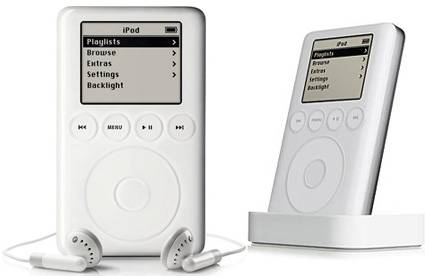
The third generation iPod-April 2003 - July 2004
This was the iPod—born of humbler pedigree—that grew up, provided for itself a higher education, and made its own way in the world. The third generation of the family rid itself entirely of mechanical buttons on its body, shed some of its baby fat around the waist down to 4.1 x 2.4 x 0.62-inches, and came forth at $299 for 10GB, $399 for 15GB, and $499 for 30GB. This was also the first iPod child to feature a remote connector and dock connector—which finally enabled USB 2.0. In September the 30GB iPod was priced at $399, and a 40GB model was released for $499.

Related theme:
The iPod family(part 2)
The iPod family(part 3)
The iPod family(part 4)
The iPod family(part 5)

Recommended Products For you:
DVD to iPod Converter for Mac
It's a specially designed iPod conversion program to Convert DVD to iPod touch, iPod classic, iPod nano, convert DVD to iTunes on Leopard.
iPod Video Converter for Mac
It can convert MP4, MOV, 3GP, AVI, RM, MPEG, ASF and FLV to iPod video with high output quality and various features .

2010年11月1日星期一

How to Convert and Edit HD Video

Because of the widely using of HD Camcorder, now it is really convenient to record family parties and other things you are interested in. Nowadays, people would like to share their things with the rest of the world through Internet, such as youtube.com and other video websites.

This guide aims to show you how to convert and edit the video you recorded using your HD camcorder
What you need is a powerful HD Video Converter.

Step 1: Load Video
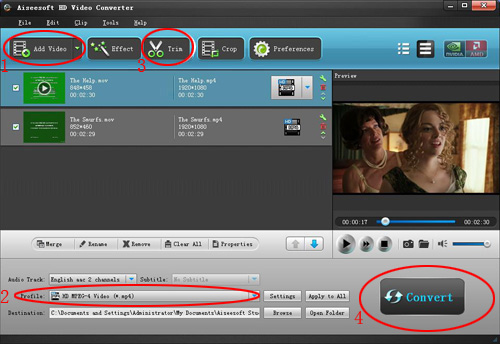
Click "Add File" to load the video that you want to convert to Aiseesoft MTS Converter.

HD video converter

Step 2: Choose Your Output Profile and Settings
From "Profile" drop-down list you can choose your output profile according to your need.
You can also click "setteing" adjust the settings of your output video, such as "video/audio encoder", "Video/audio Bitrate", "Channels", "Resolution" and so on..
Step 3: Video Editing
This powerful MTS Converter allows you to do many video editings.
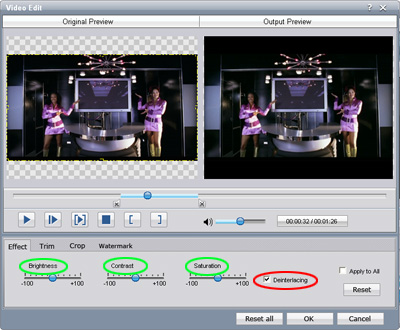
1. Click "Effect" to make special effect for your movie.
You can adjust the "Brightness", "Contrast", "Saturation" and also you can use "deinterlacing" to improve you output effect.

HD video converter effect

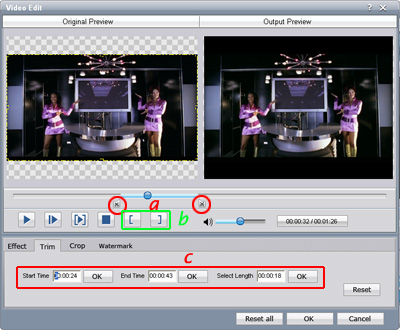
2. Trim:
"Trim" function allows you to pick up any part of your video to convert. You can just convert a part of your video that you want.

HD video converter trim

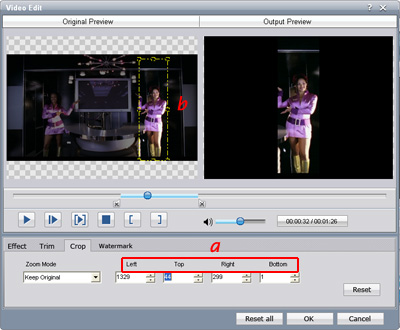
3: Crop:
Cut off the black edges of the original movie video and watch in full screen on your iPod using the "Crop" function.

HD video converter crop

Step 4: Conversion
After you have done all the steps above you can click "Start" button to start your conversion.

Here I also recommend you some High Definition video converter, MTS Converter, TS Video Converter.

How to Make iPhone Ringtone

You bought an iPhone and love all its features, but wish you didn't have to pay for your songs twice to get a ringtone. (We know that iPhone, iPhone 3G Ringtones use the file extension .M4R. And the users must pay $2 for a piece of song through Apple iTunes store). There are plenty of songs in your music library, but no way to make ringtones from any of them. Rihgt?

Actually, with a little bit of trickery (nothing illegal) you can create ringtones from any one of your non-DRM songs.

This works on both Mac and Windows PCs.

Window Users

You can create free iPhone Ringtones by yourself with Aiseesoft iPhone Ringtone Maker.
You can take the following step-by-step instructions to start.
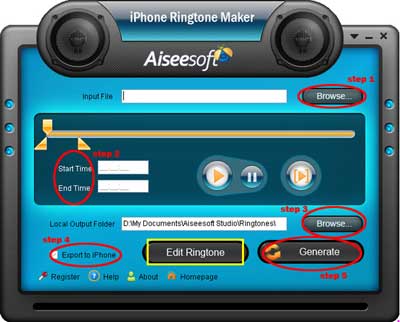
Step 0: Download and install Aiseesoft iPhone Ringtone Maker.
After a short while, you can see the following interface:

iPhone Ringtone Maker

Step 1: Click "Browse" on the right side of "Input File" to import the file that you want to make ringtone from it.
Step 2: Play it and listen the music to find the segment that you want to use it as ringtone. Then drag and click the start & end slider to set your wanted segment, or type the start & end time in the corresponding text box directly to get the exact segment. You also can pre-listen the converted audio before generate.
Step 3: Click "Browse" on the right side of "Local Output Folder" to choose the output destination.
Step 4: Check "Export to iPhone" option, the converted ringtone will be load to your iPhone directly.
Step 5: After all the settings are finished, click "Generate" to begin making your own iPhone ringtone.

Key function
* Convert any video to iPhone ringtone M4R
* Create iPhone ringtone from any audio files
* Get any clips from video and audio
* Edit Added iPhone ringtones

Using Aiseesoft iPhone Ringtone Maker, you are free to edit the added iPhone ringtone by removing it or renaming it directly.

For Mac Users, please go to Aiseesoft iPhone Ringtone Maker for Mac.