2010年6月29日星期二

As Promised: Here’s Hulu Plus, for Some of You

Here it is, finally: Hulu Plus. Otherwise known as: “The chance for some of you to fork over $9.99 a month to watch Hulu.”

What does that money get you?

As I’ve discussed before–most recently, last week–it gets you more shows than the free version offers, and more devices, most notably Apple’s (AAPL) iPad. It won’t get you ad-free shows, though. Hulu officials say the company will use the platform as a chance to extend the reach of its advertisers and that they’ve already got Nissan and Bud Light signed on.

Hulu and its joint venture owners–News Corp.’s (NWS) Fox, GE’s (GE) NBC, and Disney’s (DIS) ABC–have been working for most of the spring to get this worked out, but for now, it’s still an invite-only trial. Last week, I heard the trial might be limited to just 10,000 people, but I’ve yet to hear an official number from Hulu.

But! Hulu is allowing users with subscriptions to download a Hulu app for the iPhone, iPad, etc., to give the thing a test drive with a limited selection of shows.

Is it worth it? It should be interesting to see what consumers say. The pitch to gadget-centric folks: Check out all the hardware you can use! In addition to the iPad, Hulu Plus will work on the iPhone and iPod touch. Also included: Internet-connected TVs, Blu-ray players and game machines from Samsung, Sony (SNE) and Microsoft (MSFT).

The pitch to TV nuts: Look at all the shows you can see! But here the pitch is a bit more nuanced, because Hulu and its owners have had to hammer out, show by show, what they’re going to offer you. So it’s not an all-you-can-eat proposition, it’s an eat-a-lot proposition. Most notably, the service is light on content from cable networks, even those owned by the Hulu’s partners. Thus, no “Justified” from FX or “Top Chef” from Bravo.

That shouldn’t be a surprise, by the way: One of the main problems the original Hulu created was an increased tension between its owners and cable companies like Comcast (CMCSA), which fretted that Hulu was providing consumers with a reason to cut their cable subscriptions. Since FX, Bravo et al are getting paid by Comcast and the like for access to their shows, it will be tricky for Hulu to bundle those into its own service as well.

Is that a deal killer? I’ve found that with music subscription services, the absence of a single song I want rankles me in a slightly irrational way: Who cares if I can listen to millions of songs on demand for $9.99 a month? I want to listen to “99 Problems” right now, and I can’t! It’s easy to see Hulu Plus subscribers taking a similar view if they can’t find a favorite show when they want it.

But let’s wait and see what’s there first. Hulu says it has 120 seasons and 2,000 episodes available. Dig through and let me know if any absences are particularly problematic for you.

Press release, for those of you who like that kind of thing:

Hulu Launches Preview of Subscription Service Hulu Plus™

First subscription service to bring current TV programming from top broadcast networks ABC, FOX and NBC to 4 screens–computers, TVs, mobile phones and tablets–in HD Quality

Hulu Plus will complement the free, ad-supported Hulu service allowing consumers to enjoy more wherever, more whenever, than ever

LOS ANGELES—June 29, 2010–Hulu™ today launched a preview of Hulu Plus™, the first ad-supported subscription service to offer full current season runs of hit TV programs from ABC, FOX and NBC across multiple Web-connected devices, in HD, for only $9.99 a month. Now, TV lovers can watch full current seasons of shows such as Glee, Family Guy, Grey’s Anatomy, Modern Family, 30 Rock and The Office and full series runs or multiple back seasons of shows like The X-Files, Arrested Development, Desperate Housewives and Law and Order: SVU on PCs and Macs as well as on Apple’s iPad and iPhone, and select 2010 Samsung Blu-ray players, Blu-ray Home Theater systems, and TVs through Samsung Apps, in up to 720p high-definition resolution. Hulu Plus will also be coming soon to the PlayStation®3 (PS3™) computer entertainment system.

“We’re thrilled to begin sharing this revolutionary new service with subscribers” said Jason Kilar, Hulu CEO. “Hulu Plus is the first subscription service that offers consumers a wide array of today’s top current TV series on all four screens, in HD. With Hulu Plus, now your favorite TV shows love you back.”

View the Hulu Plus demo video for an overview of the full service.

More Content–Over 100 Content Providers, Hundreds of Shows, Thousands of Episodes
Hulu Plus builds on the extensive content offering of the ad-supported, free Hulu service and brings together one of the deepest offerings of TV shows, both current and classic, to subscribers in the U.S. Every episode of more than 45 current hit programs from ABC, FOX and NBC will be available all season long, from Modern Family and Grey’s Anatomy to Glee and Family Guy to The Office and 30 Rock. In addition, TV lovers will be able to enjoy full series runs and numerous back seasons of dozens of classic shows like The X-Files, Law and Order: SVU, Arrested Development, Saturday Night Live, Miami Vice, Ugly Betty, Quantum Leap, Buffy the Vampire Slayer, Angel, Roswell and Ally McBeal.

The Hulu Plus library aggregates content from more than 100 providers across broadcast networks, major studios and independent content creators. For content owners, Hulu Plus offers a compelling new way to distribute and monetize their programs across multiple screens.

For a full list of content providers and shows available, view the Hulu Plus Content page.

Access Anywhere–Across Four Screens on Multiple Devices
Subscribers to Hulu Plus will be able to watch their favorite shows not only on their PCs and Macs but also on select mobile phones, televisions (through gaming consoles and other boxes connected to the TV, or directly through Internet-connected TVs), Blu-ray players, and tablets, including Apple’s iPad and iPhone. Hulu’s preview launch device partners include the Apple iPad, iPhone 3GS, iPhone 4, and third-generation iPod Touch; select Samsung connected TVs, Blu-ray players, and Blu-ray home theater systems; and PS3 coming soon.

In the coming months, Hulu Plus will also be available on additional Sony Electronics Internet-connected entertainment devices including select BRAVIA® TVs and Blu-ray Disc™ players, as well as select TVs and Blu-ray players from VIZIO. In early 2011, Hulu Plus will launch on the Xbox 360. Hulu will continue to evaluate opportunities to extend Hulu Plus to other hardware devices and platforms as well.

For more information on supported devices and system requirements for Hulu Plus, please refer to the
Hulu Plus Device Partner page.

High Quality Viewing Experience–Streaming in HD
Hulu continues to push the quality of the online video viewing experience forward. Hulu Plus will bring many programs to users in 720p high definition to take advantage of the high-resolution screens on HD-capable devices. On select devices, adaptive bitrate streaming will ensure the highest quality video streams for the viewer’s bandwidth.

Advertising
Hulu Plus enables Hulu, for the first time, to extend its innovative and targeted ad platform across four screens, reaching Internet-connected users wherever they are. For the preview launch of Hulu Plus, Hulu is partnering with leading marketers Nissan and Bud Light who are expanding their reach with Hulu’s engaged and connected audience. Hulu expects to include additional advertisers for the broad consumer launch of Hulu Plus.

Pricing & Availability
Hulu Plus is available to U.S. consumers for $9.99 per month. Hulu Plus is currently available as a preview during which subscriptions are offered by invitation only to enable Hulu to ensure the highest quality experience for each user and to responsibly scale the service over time. To request an invite, visit www.hulu.com/plus.

Even without an invite, during this preview period consumers are welcome to download a free Hulu Plus application to the iPad, iPhone 3GS and 4, and third-generation iPod Touch, and other supported devices to test the experience with a limited selection of free episodes and clips. Hulu Plus is expected to be made widely available to the public in the coming months.

iPhone 4: Stock-Outs at Apple Stores, New Orders Now Shipping in Three Weeks

Apple is selling the iPhone 4 as fast as it can make it–actually faster. With demand for the device off the charts after first-weekend sales, the company’s online storefront is now showing a ship time of three weeks for new orders. And Deutsche Bank analyst Chris Whitmore says that his survey of brick-and-mortar stores shows frequent stock-outs. “Demand is outstripping supply in multiple regions despite frequent replenishment,” he wrote in a research note issued this morning.

According to Whitmore’s survey of 100 iPhone 4 retail outlets (Apple, AT&T, Best Buy, O2, Orange and Car-Phone stores in the U.S. and U.K.), 60 percent of Apple Stores were sold out by Thursday evening, as were 100 percent of retail-partner stores. Supplies were replenished overnight, but by end-of-day Friday, quite a few stores were reporting stock-outs. And that number only grew on Saturday.

“Our checks carried out on Saturday revealed that Apple retail stores which were stocked-out on Thursday/Friday were unable to replenish stocks with ~95 percent of stores contacted experiencing stock-out situations. Further, most Apple representatives were not certain about the iPhone 4 stock replenishments and comments such as ‘We’re out of stock’, ‘Don’t know when we will have them in store’, ‘We sold out just minutes ago’, ‘No, we don’t know when we will be getting the phone’ and ‘Your best bet is the online store’ were cited frequently,” Whitmore reported.

“In addition,” according to the analyst, “retail stores which had iPhones in-stock cited long lines (2 to 3 hours) outside the stores. Comments such as ‘We have very limited numbers, we should be sold out in a couple of hours’ and ‘Please give us a call just before you leave home to make sure the iPhones are in stock’ suggested waning inventory levels.”

Whitmore figures Apple (AAPL) sold more than one million iPhone 4s over the weekend, but notes that shipments could have been dramatically higher if there was more supply.

“While the strong start is encouraging, we believe the long-term opportunity for growth of the iPhone is even more significant as near-term shipments are being gated by supply constraints,” Whitmore wrote. “We estimate Apple to sell 44 million iPhones in CY10 (8.5 million in the June quarter) and 55 million in CY11.” (See chart below; click to enlarge.)

2010年6月27日星期日

Should Facebook Charge for Privacy?

Not surprisingly, Facebook’s half-hearted attempts to kick its data-sharing addiction have not exactly wowed the privacy cognoscenti.

Jeff Tinsley, CEO of MyLife.com, has another idea: If you really want Facebook to protect your privacy, you should pay them for the privilege. No, he’s serious. And he’s got a good point.

The idea is simple: If you’re a paying customer, Facebook doesn’t need to monetize your data so heavily via ad deals. That means it has less incentive to butter your data all over the InterWebs and more incentive to keep its paying customers (ie, you) happy.

Read the rest of this post on the original site »

2010年6月25日星期五

Some problems the new iPod touch users may meet

1. How to change iTunes to recognize the new iPod touch
Some New iPod users may meet the situation that your iTunes can not detect your new iPod nano, iPod touch, or iPod Classic. It should recognize it immediately. If it doesn't, download the latest version of iTunes. The problem will be solved:
1) Re-launch iTunes, with and without your iPod plugged in.
2) With iTunes open, reset your iPod Touch
(here:http://docs.info.apple.com/article.html?artnum=305743 ) Press and hold the Sleep/Wake button and the Home button at the same time for at least ten seconds until the Apple logo appears.
3) Restart your computer leaving your iPod touch plugged in
Note: If you uninstall iTunes from a computer, it will be uninstalled for all the users. But it will show up again for all users once you re-install it again. Before uninstalling each user should backup his/her playlists so they can bring them back when the re-install is completed.No music for any of the users will be removed by iTunes. It will remain intact where it is saved.

2.'I can't turn on my iPod'
I have a 1st or 2nd generation video iPod (80 gig).
My computer is windows 2000 so I downloaded the windows 2000 iTunes. So I decided to update my iPod, it was updated and it was fine. It ran out of power. Then it won't turn on? I tried to charge it but it just keeps saying please wait such and such. I left it there for like 2 hours already, and still it didn't charge up... Is the problem because I updated my iPod or something else? And when I opened my computer, iTunes asked me if I can format my iPod into windows. I put yes, it didnt do anything.So I have to problems, its not charging.. and its not turning on.
by Ashley :'My friend had this same problem a few years ago.She just left it plugged in to her computer for a few days, waited it out... eventually the problem fixed itself on its own. I'd say just wait it out for a day or two, and if it's still having problems, take it in to your nearest Circuit City or something.”
by Karat :'its the most popular iPod problem. If you drain the battery fully, you're screwed. Basically the battery is down, but the darn thing wont charge unless you connect it to the usb and the usb wont detect it unless it has charge! So please take it to your nearest apple outlet.”
by Kylla :'The one thing you never want to do with an iPod is let it run out of power, not good for it at all :P I've done it a few times but try to avoid it. What you want to do is hold the menu button and the play/pause button at the SAME time and just wait for it. It should restart it. Thats how my iPod works, yours could be different so experiment with the buttons. Try holding perhaps the center button and the play/pause button? or center button and the menu button? Try to see which two buttons will restart it, its bound to work. But hold BOTH of them down at the SAME time with one hand..and be patient, wait for about 10-15 seconds or so. :)”

3. Why does my 30G iPod video always die quickly?
Even when I am just listening to music. It shuts off after about 45 min. And that is a problem because I am going on a plane trip soon and I plan to watch a movie on my iPod, but movies eat your batttery. Does this happen to anyone else???? How can I make the battery life last longer. btw, it is only like a year old.
by dipin :'In an iPod the battery life is different.
it doesnt depend on how old it is rather it depends on how many times you have charged and discharged it.
for increasing the battery life you should fully charge the battery every time you are charging it . and secondly you should never let it discharge completely . put it on charging just before it shows the red signal and disconnect it only when it is fully charged.
sorry to say but now u'll have to get the battery replaced from apple reseller if you want to watch complete movie the battery life as said by apple is 500 complete cycles of charging and discharging”
by sugadoll :'The same thing happened to me. The problem is that your computer can't detect a completly dead iPod, but you need the computer to charge it so your screwed. j/k I solved it by pluging it into my ihome dock that plugs into the wall. So if you have a wall iPod dock or a car one you can charge it enough so that the computer can detect it. Problem solved.

Recommended Products For you:
DVD Ripper for Mac
Convert DVD to any video or audio formats on Mac OS X. Aiseesoft DVD Ripper for Mac is a professional Mac DVD ripper software.
Video Converter for Mac
Convert all video formats from one to another on Mac OS X. Aiseesoft Video Converter for Mac is a specially designed Mac video converter.

How to play DVD on Mac

This tutorial includes 4 parts:
Part 1, DVD Regions
Part 2, How to play DVD on Mac?
Part 3, How to Unlock DVD Regions on Mac?
Part 4, how to copy protected DVD Movie on Mac OS X

Part 1, DVD Regions
Region 1: North America; U.S. territories; Bermuda
Region 2: Europe; Western Asia; Kingdom of the Netherlands; Egypt, Japan, Lesotho, South Africa, Swaziland; British overseas territories, French overseas territories; Greenland
Region 3: East and Southeast Asia
Region 4: Oceania; Central and South America; Caribbean; Mexico
Region 5: Africa, Central and South Asia, Belarus, India, Mongolia, North Korea, Russia, Ukraine
Region 6: Mainland China

Part 2, How to play DVD on Mac?
VLC is part of a remarkably sophisticated suite of VideoLan applications available for a wide range of operating systems, ranging from Linux to Windows and, of course, Mac OS X.
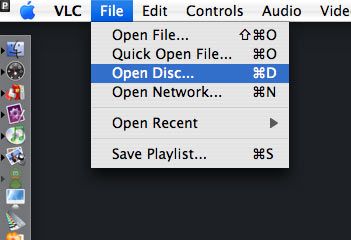
Download and install VLC and open it, then select File > Open Disc. Click on the Disc tab, click on DVD, select the device, and click OK
Or select File > Open File..., select your VIDEO_TS folder, and voila! You're watching your movie.

Play DVD on Mac

Part 3, How to Unlock DVD Regions on Mac?
Most commercial DVDs use encryption that keeps them locked to one or more “region codes,” meaning the discs you pick up in other continents usually won't play on an American DVD player. If you believe the movie studios, this encryption is a necessary tool in the ongoing war against piracy. Basically, it helps them release the same movie in different parts of the world—at different times and for different prices. However, because pirates rarely resell legitimate copies of movies (they are pirates, after all), this system's primary effect is to prevent movie collectors and frequent travelers from enjoying legally purchased films once they get home.
There are some multi-region DVD players out there. They are perfectly legal, but they tend to be pricey and rare. And if you are the jet-setting type who is likely to pick up foreign flicks in the first place, you probably want to watch them on the go using your laptop. That's why the most frustrating part of region codes is the way they affect laptop DVD players.
Although laptop DVD drives are technologically capable of playing any DVD, they typically force you to switch among region settings to play imported discs. Try switching this setting more than a fixed number of times (typically five over the entire life span of the computer), and the setting will be locked forever.
For example, if you switch from Region 1 (the United States and Canada) to Region 3 (parts of Asia) to watch a kung-fu flick you picked up on a trip to Hong Kong, you'll have to switch back to Region 1 before playing any movies you purchased at your local Best Buy. Watching that one Jet Li movie just burned up two of your five switches—and not even reinstalling your operating system will get you more. Fortunately, some clever programmers have created software solutions that circumvent disc regions entirely, turning your notebook into a portable multiregional DVD player.
There are plenty of programs for Macs that allow you to rip DVD movies on Mac. I recommend Aiseesoft DVD Ripper for Mac which allows you to rip DVD movies on Mac easily. This Mac DVD Ripper is fast in ripping DVD to all popular video and audio formats as it includes the features of DVD Ripper and DVD Audio Ripper. It can rip DVD video to video formats including MP4, AVI, MOV, M4V, 3GP, MPG, MPEG, FLV, etc. and it can convert DVD audio to MP3, M4A, AAC, AC3, etc. It's the best solution to rip a dvd to video or audio formats on Mac. This solution has its advantages (chief among them is that watching movies off your hard drive uses far less battery life than reading them from an optical disc.)
If you do not want to spend money, I recommend downloading VLC, an open-source media player that sometimes circumvents region encoding. The DVD drives on different computers (including various Macs) come from diverse manufacturers, a.nd VLC plays out-of-region discs on some, but not all of them. Unfortunately, there's no way to know if it will work on your system until you try. Fortunately, the program is free.

Part 4, how to copy protected DVD Movie on Mac OS X
Copy protected DVD action can turn into failure if you don't have appropriate software. Very often DVDs are protected against ripping and thus copying the contents of the disc to your hard disk doesn't work. Even if you do succeed in ripping the contents of the disc, to copy protected DVD also means to fit the files on your recordable DVD since the latter can only hold 4.4GB of data while the original DVD is more than 7GB in size.
Copy protected DVD software for those, who have no experience whatsoever with backing-up DVDs, is big deal. DVD Copy for Mac

2010年6月22日星期二

How to rip DVD, convert video, transfer iPod music and make iPhone ringtone for Windows/Mac

This guide aims to show you how to rip a DVD, convert video and transfer music between iPod and computer/two iPod, make your own iPhone ringtone.

Part 1. How to rip DVD to iPod/iPhone/Sansa/PSP/Zune and other MP4 and MP3 Players
Part 2. How to convert all video to MP4, AVI, FLV, 3GP, WMV, MOV, MPG, RM, RMVB, MKV, VOB…
Part 3. How to transfer music from iPod to computer, computer to iPod, iPod to iPod.
Part 4. How to make your own iPhone ringtone for free

Believe or not, to do the things above what you need is download Aiseesoft DVD Software Toolkit and few clicks.

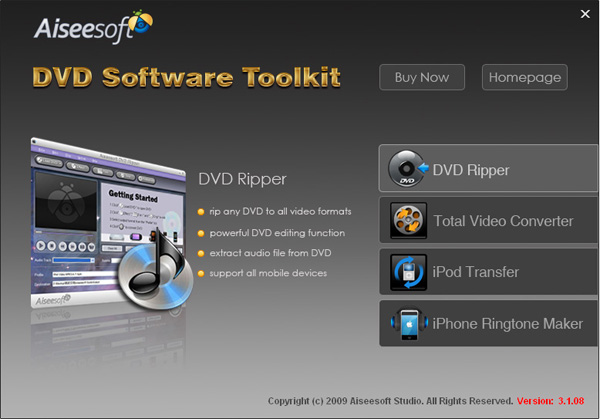
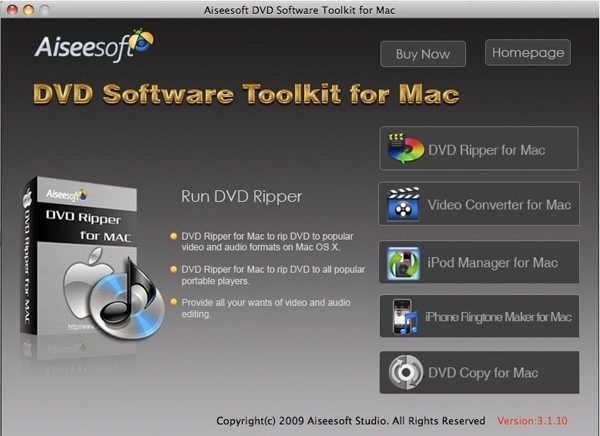
DVD Software Tookit

Part 1. How to rip DVD to iPod/iPhone/Sansa/PSP/Zune and other MP4 and MP3 Players.
Step 1. Click “DVD Ripper” on the main interface to run Aiseesoft DVD Ripper

DVD Ripper

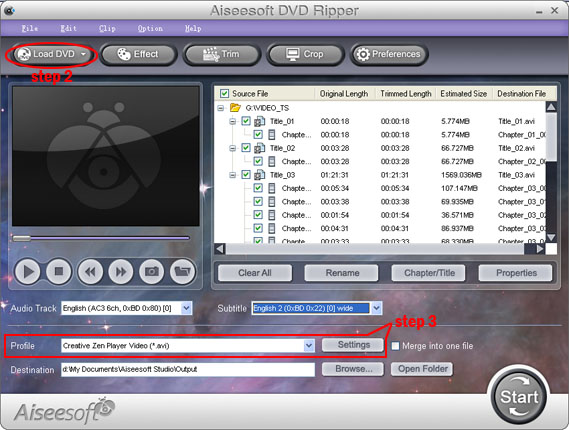
Step 2. Open your DVD Drive and put your DVD in it, then click “Load DVD” and choose “Load DVD” to load your DVD into this best DVD ripper.
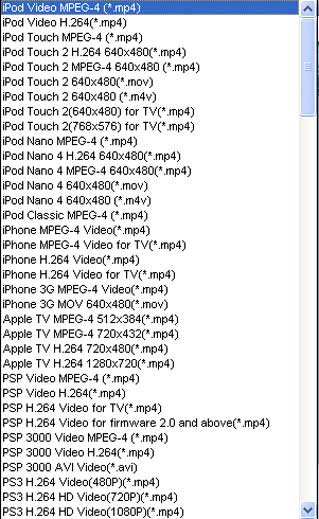
Step 3. Choose your output format from the “profile” drop-down list. This best DVD ripper provides you so many formats that out of your expectation, such as “iPod video MPEG 4 (*.mp4)”, “iPhone 3G MOV 640*480 (*.mov)” and so on.
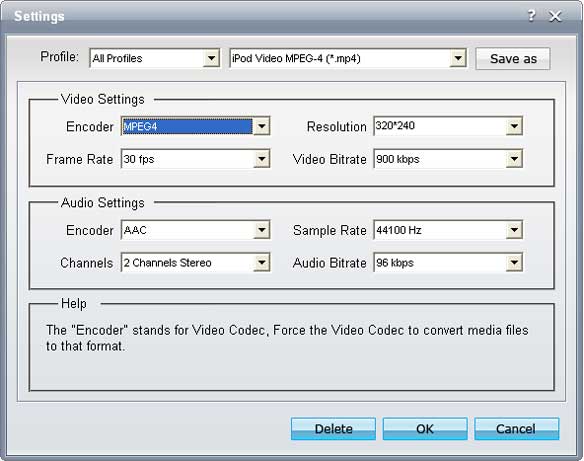
After you choose your output format, you can adjust your output video’s settings, such as “Resolution”, “Frame Rate”, “Bitrate”, “Sample Rate” and so on.
Click “Start” now to begin your conversion and you will get your video soon.
To make your output movie more enjoyable you can do some editings to it through this best DVD ripper. You can choose a part of your movie to convert (trim), remove the black edges of your DVD movie (crop) and also adjust the effect (effect) and select subtitle and audio track.

Part 2. How to convert all video to MP4, AVI, FLV, 3GP, WMV, MOV, MPG, RM, RMVB, MKV, VOB…

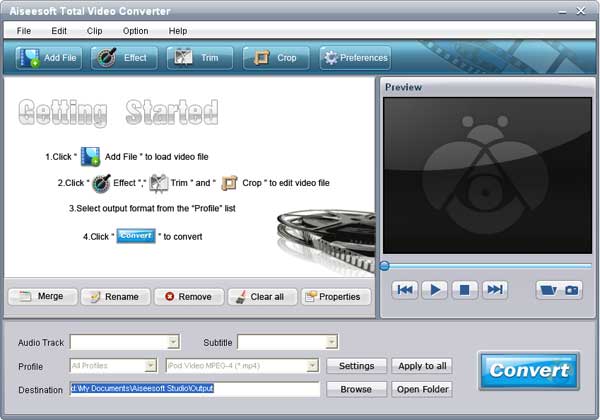
Step 1. Click “Total Video Converter” on the main interface to run Aiseesoft Total Video Converter

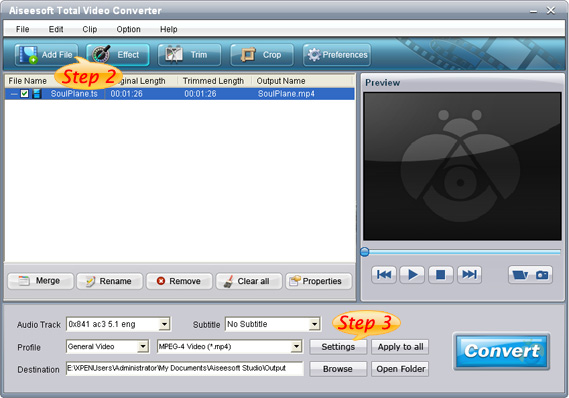
Total Video Converter

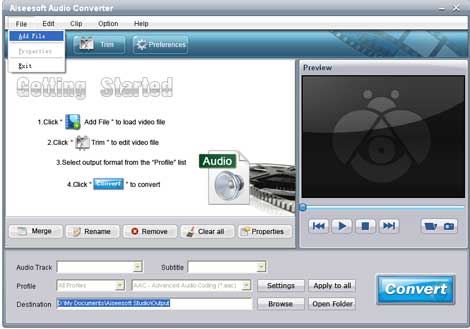
Step 2. Click “Add File” to load the video you want to convert.
Step 3. Choose output format by clicking “profile” and customize your own output video by clicking “settings” to adjust the Resolution, Frame Rate, Bitrate and so on.

Before you click “Start” to begin your conversion, you can do some editing works, such as pick up a part of your video to convert(trim), choose your own play region(crop) and put two or more files into one.(merge into one file).
OK, now you can begin your conversion

Part 3. How to transfer your songs and videos bewteen iPod and computer/iPod

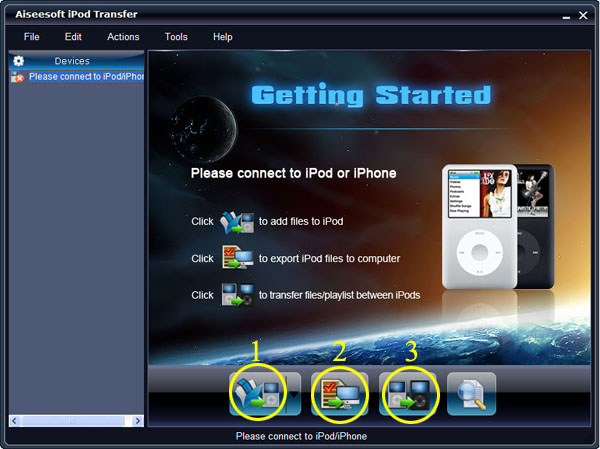
First, Click “iPod Transfer” to run Aiseesoft iPod Transfer


iPod Transfer

Click “Computer to iPod” button, it will allow you to transfer songs and videos from your computer to iPod easily.
Click “iPod to Computer” button, it will allow you to backup your songs and videos from iPod to your computer.
Click “iPod to iPod” button, it will allow you to transfer songs and videos from one iPod to another iPod dirrectly.

Part 4. How to make your own iPhone ringtone for free

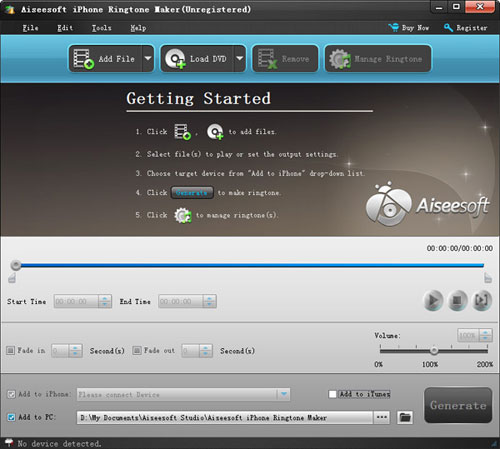
Download Aiseesoft iPhone Ringtone Maker

iPhone Ringtine Maker

Step 1: Click “Browse” on the right side of "Input File" to import the file that you want to make ringtone from it.
Step 2: Play it and listen the music to find the segment that you want to use it as ringtone. Then drag and click the start & end slider to set your wanted segment, or type the start & end time in the corresponding text box directly to get the exact segment. You also can pre-listen the converted audio before generate.
Step 3: Click “Browse” on the right side of "Local Output Folder" to choose the output destination.
Step 4: Check "Export to iPhone" option, the converted ringtone will be load to your iPhone directly.
Step 5: After all the settings are finished, click “Generate” to begin making your own iPhone ringtone.
If you are a Mac user, I recommend you Aiseesoft DVD Software Toolkit for Mac

it has the same functions as the windows one. You can use it easy rip your DVD, convert your videos, transfer your iPod songs and videos bewteen iPod and your Mac and also make your own ringtone.

DVD Software Toolkit for Mac

Dell Now a Chrome OS Partner?

Google’s Chrome operating system is still months from market, but it is already generating interest among PC makers who wonder if it might offer an alternative to Windows. Among them: Dell (DELL), which is in talks with Google (GOOG) about using Chrome in some of its laptops.

“We have to have a point of view on the industry and technology direction two years, three years down the road, so we continuously work with Google on this,” Amit Midha, Dell’s president for Greater China and South Asia told Reuters. “There are going to be unique innovations coming up in the marketplace in two, three years, with a new form of computing, we want to be on that forefront….So with Chrome or Android or anything like that we want to be one of the leaders.”

An interesting remark, though perhaps not entirely unexpected. After all, Dell is already using Google’s Android mobile OS in its new Streak tablet and Aero smartphone. That said, Dell was not named in Google’s initial official list of Chrome OS partners or in the updated list that followed.

2010年6月20日星期日

Google Eyes Demand Media’s Way With Words

A patent recently granted to Google (GOOG) appears to replicate one part of what has made Demand Media’s approach to content so successful.

Founded in 2006, just six months after Mr Rosenblatt sold his internet company MySpace to Rupert Murdoch’s News Corp, Demand is already planning an initial public offering valuing it at about $1.5bn–based on a belief that it has discovered a low-cost but immensely profitable new model for online media.

Read the rest of this post on the original site »

MySpace Co-President Jason Hirschhorn Leaves

Jason Hirschhorn joined MySpace a little more than a year ago as chief product officer. In February, he was put in charge of the ailing social network, along with Mike Jones. Now he’s out.

TechCrunch reported the move this afternoon, and I’ve confirmed it with my own sources, who tell me Hirschhorn does not have a new job lined up. Here’s Hirschhorn’s version of the announcement, via Twitter:

And here’s a statement from Jon Miller, the News Corp. (NWS) exec tasked with turning around the once-dominant site:

We fully respect Jason’s decision to leave and his personal desire to return to New York. As many people know, Jason is like family to me, and as expected, he’s done everything we asked of him and more. We’re incredibly grateful for the passion and enthusiasm he brought to the company. And as I know Jason agrees, Mike Jones has done an outstanding job leading MySpace into its next evolution and is the right person to take the reins. There are no plans to bring in additional management.

And finally, HIrschhorn’s goodbye note to his staff:

From: “Jason Hirschhorn”
Date: June 17, 2010 5:20:38 PM EDT
To: “FIM MySpace All”
Subject: My Transition

MySpacers,

I wanted to share some personal news with you. After much thought I have decided to leave MySpace. It was a hard decision, but is weighted in my desire to move back to New York City.

The past 15 months have been the most exciting in my career. The challenge that we have all worked on together, reinventing MySpace, is a dream project.

With the roadmap in a solid place, the Futura designs being executed now, and a new leadership firmly in place, I felt this was a good time for me to transition out.

I did not take this decision lightly. But given my faith in my partner Mike Jones and his brilliance, coupled with the amazing teams we have in place, I feel as optimistic as ever about MySpace.

I cannot thank Rupert, Jon and Owen enough for giving me the opportunity to work at MySpace. It has been a pleasure working with each and every one of you.

I will be in the office until the end of the month and available to Jon and Mike during the transition.

You are all family. I will miss you.

P.S. My mom is pissed I am leaving LA!

Best,

Jason

Hirschhorn’s departure isn’t a total shock: It’s hard to find an example of any company, anywhere, that has really worked with more than one person in charge.

And Hirschhorn always seemed like an uneasy fit at MySpace, though his mood seemed to improve when former boss Owen Van Natta was moved out earlier this year. I’m told that he’s leaving on much more amicable terms than Van Natta and may end up working with Miller on some other News Corp. digital projects.

Still, despite Hirschhorn and Miller’s sunny description of MySpace, it is very much a troubled, money-losing asset. Former rival Facebook eclipsed it in audience, dollars and mojo long ago. And an ad deal with Google (GOOG), which generated the bulk of its revenue for years, is expiring very soon.

The most charitable description of MySpace would be a “work in progress,” which is the phrase News Corp. COO Chase Carey likes to use, over and over.

The good news for Hirschhorn’s former co-worker Jones: If he can show any positive result at all, the glory will be all his.

2010年6月18日星期五

How to play iPod video on TV

You may often confused with how to play iPod video on TV without Apple TV? Here is a guide to do this.
Note: This method is not usable for the 6th generation iPod.

What You'll Need
In order to get your iPod connected properly to your TV, you'll need the following items on hand:
A video-capable iPod. Any color will do.
An iPod-compatible video. Load it onto your iPod through iTunes.
Note: iPod accepts mp4 video detail as: MPEG-4 video, up to 2.5 Mbps, 640 by 480 pixels, 30 frames per sec., Simple Profile with AAC-LC audio up to 160 Kbps, 48 kHz, stereo audio in .m4v, .mp4, and .mov file formats.
If your videos are not iPod format files, you can use Aiseesoft iPod Video Converter for Mac to convert videos to iPod format files. Aiseesoft iPod Video Converter for Mac is one of the best video to iPod converters on Mac os which can convert MP4, 3GP, AVI, WMV, RM, MPEG, and FLV to iPod video with very high quality and various output settings in high speed(>300%). If you use Windows, you can use iPod movie converter for windows.
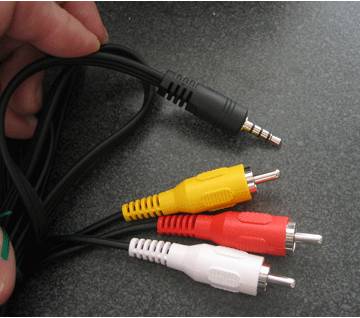
An A/V cable. If you don't already have an eighth-inch-to-RCA cable, you can pick one up on eBay for five or six bucks shipped. Search for "camcorder A/V cable." Remember, you want a three-plug yellow/red/white RCA connection at one end and a three-banded eighth-inch (3.5mm) A/V plug at the other.

A/V cable
Figure 1. A camcorder A/V cable has a three-plug RCA connection at one end and a three-banded 1/8" plug at the other

Setting Up Your iPod Video Options
Setting up your iPod video options lets you control how you export video. The iPod Video Options screen selects how your iPod handles video file playback.
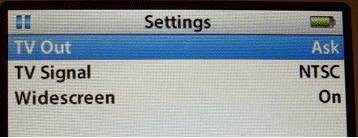
To open these settings, choose Videos -> Video Settings from your main iPod menu. This screen offers three settings: TV Out, TV Signal and Widescreen. Adjust to produce the video playback style you need.

Play iPod Video on TV
Figure 2. Videos -> Video Settings controls the way your iPod plays back video files

TV Out
Whenever you play a video file, your iPod must make a choice. Video iPods either play video on the built-in screen or they transmit a video signal out of the microphone jack. They don't do both. The TV Out option controls which behavior occurs.
Use this setting to choose from:
No. Playback remains on the iPod itself.
Yes. A TV signal is produced.
Ask. The iPod prompts you whenever you play a video file.
I always use the Ask option. Yes, it does add an extra step whenever I play a video file, but it gives me the flexibility to choose playback behavior on a case-by-case basis. I like that.

TV Signal
European and Australian television sets use a different signal standard than those used in America and Japan. If you live in the U.S., your TV works with the NTSC standard. European countries mostly use PAL. Make sure you've selected the correct signal for your country.
Widescreen
iPods can play back widescreen video, if only on exported video. The built-in screen uses a traditional 4:3 screen ratio, rather than widescreen's 16:9 proportions. Choose Yes to produce a widescreen signal, or No to export the traditional TV output.
Connecting the iPod to TV
It takes a few steps to connect your iPod to your TV. Start by inserting the A/V cord's eighth-inch plug into your iPod's earphone jack. In it goes, schnickt. Couldn't be eas.
Here's where it gets a little tricky. In order to make your TV play back the iPod signal, you've got to redirect the outputs. You can't just plug the yellow RCA plug into the yellow RCA jack and the red into the red or the white into the white. No. Those geniuses at Apple send the video signal over the red RCA output. (Normally it arrives on yellow.) The sound comes through the white and yellow plugs.
I ended up going to an Apple store and testing this on iPod after iPod. They all have this quirk. It was intentional. But hey, it's proprietary. Woohoo. So here's what you have to do:
- Plug the red RCA plug into your TV's yellow RCA jack.
- Plug the yellow RCA plug into your TV's white RCA jack.
- Plug the white RCA plug into your TV's red RCA jack.

Play iPod video on TVPlay iPod video on TV
Figure 3. Left: TV jacks, unplugged; right: TV jacks, plugged with A/V cable.

After making all of these connections, you're physically ready to begin playback.

Playing Your Video
On your iPod, navigate to the movie you want to watch and select it. Your iPod prompts you to choose whether to play the video with TV Off or TV On. (You set the TV Out option to "Ask," remember?) Choose TV On.Play iPod video on TV
Figure 4. Choose TV On to redirect the video through the earphone jack.
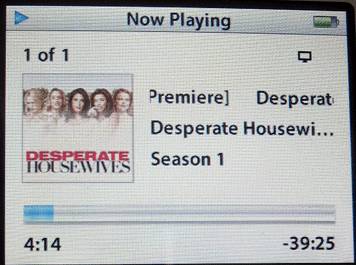
As your video starts, a status screen appears on your iPod and the video plays back on your television. The status screen tracks playback progress, just as it would in iTunes.Play ipod video on tv
Figure 5. The iPod video status screen shows playback progress.
Leave the television volume control at normal levels and use the iPod volume control to adjust the audio. The audio and video should both sound and look excellent.

2010年6月16日星期三

How to use Mac TS converter to convert TS to MP4, MOV, etc on Mac OS X

What is TS?
Transport stream(TS, TP, MPEG-TS, or M2T) is a communications protocol for audio, video, and data which is specified in MPEG-2 Part 1, Systems (ISO/IEC standard 13818-1). Its design goal is to allow multiplexing of digital video and audio and to synchronize the output. Transport stream offers features for error correction for transportation over unreliable media, and is used in broadcast applications such as DVB and ATSC. It is contrasted with program stream, designed for more reliable media such as DVDs.
TS format is a container format that encapsulates pocketsize elementary streams and other data.
Important elements of a transport stream: Packet, PID, Programs, Program Specific Information (PSI) , 1 PAT , PMT , PCR , Null packets

How to play TS files on Mac?
You need media player to play TS files on Mac OS X:
VLC media player is a highly portable multimedia player for various audio and video formats (MPEG-1, MPEG-2, MPEG-4, DivX, mp3, ogg, ...) as well as DVDs, VCDs, and various streaming protocols. It can also be used as a server to stream in unicast or multicast in IPv4 or IPv6 on a high-bandwidth network. It supports Mac, linux, Windows.
How to convert TS to MP4, AVI,MOV, etc on Mac?
You need a video converter for Mac to convert TS to MP4, AVI, MOV, etc on Mac. Then you can put them on iPod, iPhone, PSP, Xbox 360, iMove, other potable players.
Step 1: Download TS Video Converter for Mac:
We recommend you Aiseesoft Video Converter for Mac which can convert TS to MP4, Convert TS to AVI perfectly. This Mac TS Video Converter also can extract audio from TS and Convert to MP3, M4A, etc. Compared with other video converters, this TS video converter for Mac provides you with better output quality, more advanced functions and higher conversion speed. You can download free trial Version here: for Mac intel users, for Mac PowerPC users. Then install and run this program. The trial version should be fully functional for what you want to do.
Step 2: Load the TS files you want to convert

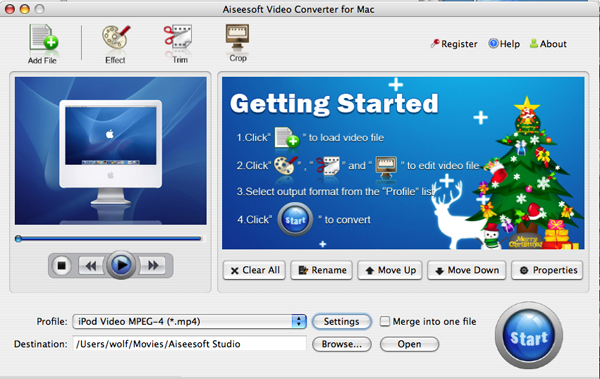
Video Converter for Mac

Click the "Add File" button to browse your computer hard disc and add the .TS files you want to convert to the program.
Step 3: Output Settings
After you added TS files, you can select an output format for each video file and specify a directory on your computer to save the output files.
The TS Converter for Mac supports comprehensive video formats including AVI, MPEG, WMV, MP4, XviD, 3GP, FLV, etc.
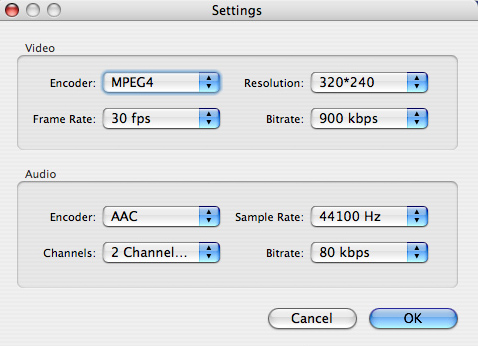
If you don't know what formats your device supports, you can just select the format according to the device name. Of course, if you don't want to use the default video and audio encoding settings, just click the "Settings" button to customize these settings.

Video Converter for Mac - settings

Step 4: Edit your TS files
This TS Video Converter for Mac set video brightness, contrast, saturation, crop video, trim video/audio and even merge multiple files into one file.

Step 5: Start the conversion
Click the Convert button to start conversion and then you can just go out for a walk or take a nap, and the conversion may have been finished when you come back: )

Modifications of transport stream specification for random-access media (M2TS)
Transport Stream was designed for tape and broadcast, but it required modifications for usage with random-access media devices like new generation of digital camcorders that record onto DVD disks, hard drives or solid-state memory cards.
Random-access based systems may save data packets into a temporary buffer if a storage device is not ready, for example on device startup. Packets are written out of order, and to keep track of them, a 4-byte timecode (TC) is added to standard 188-byte packets. The result is a 192-byte packet. This is what is informally called M2TS stream. Sony calls it "BDAV MPEG-2 transport stream". JVC calls it TOD (possibly an abbreviation for "Transport stream on media") when used in HDD-based camcorders like GZ-HD7.[9] M2TS transport stream is also used for AVCHD video files, which often have MTS extension.

2010年6月14日星期一

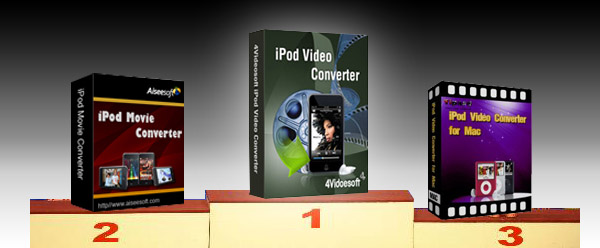
Top 5 Best iPod Video Converter Review

There is hundreds of iPod software available now. After the wide investment, for you to manage your iPod efficiently, we made this iPod Video Converter Review for the best iPod Video Converters. It includes iPod Nano Converter, 3gp converter iPod, etc. So it is also the video converter review.

1. 4Videosoft iPod Video Converter
Free Download  $29.95
This iPod video converter can assist you convert MP4, MPG, MPEG, MOV, M4V, RM, WMV, ASF, MKV, 3GP, MOD, TOD, etc, even the YouTube FLV video to your iPod video or audio supporting formats.
More features:
* So cool and friendly user-interface for you to easily and quickly operate.
* Support all video and audio sources.
* More helpful editing functions for you to create your own video.
* Excellent and timely support email services.
* Free upload for life included.
* Customize output settings.

Any of the five iPod software is good. They all have the excellent features to meet your needs.

2. Aiseesoft iPod Movie Converter
Free Download  $29.00
This iPod software is designed for Windows iPod users. Convert all video and audio formats to iPod MP4, H.264, MP3, AAC, M4A.
More features:
* Easy, simple and quick installation and operation.
* Accept MPG, MPEG, MPEG2, VOB, MP4, M4V, RM, RMVB, WMV, ASF, MKV, TS, MPV, AVI, 3GP, 3G2, FLV, MPV, MOD, TOD.
* High-quality of converted video and audio.
* More editing functions: Trim, Crop, Merge into one file, Take snapshot.
* Free and life-long upgrade.
* 7*24 online email support.

3. Tipard iPod Video Converter
Free Download  $19.00
This is another best iPod Video Converter for Windows user to convert any video and audio sources to iPod MP4, H.264, MP3, AAC, M4A.
More features:
* Fully support Windows NT4/2000/2003/XP and Windows Vista, Windows 7 Hardware.
* Support batch conversion.
* Allow preview during the whole process.
* You decide the video size via adjusting the specific parameters of output file.
* Convert 3GP, FLV to iPod easily.
* The output quality is excellent.
* Life-long upgrade.

Best iPod Video Converter

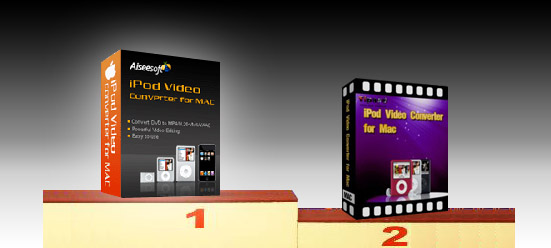
4. Aiseesoft iPod Video Converter for Mac
Free Download (Intel, Power PC)  $29.00
This iPod software is the best iPod video converter for iPod Mac users to convert any video and audio formats to iPod MP4, H.264, MP3, AAC, M4A.
More features:
* Possessed with friendly user-interface.
* One of the quickest software available.
* Preview available during the whole process.
* Capture any time-length clips from source video.
* Adjust the aspect ratio.
* Pre-set the specific parameters for output format.
* Capture your favorite pictures.
* Supported formats: MPG, MPEG, MPEG2, VOB, MP4, M4V, RM, RMVB, WMV, ASF, MKV, TS, MPV, AVI, 3GP, 3G2, FLV, MPV, MOD, TOD, AAC, AC3, WAV, MID, WMA, M4A, RA, RAM.

5. Tipard iPod Video Converter for Mac
Free Download (Intel, Power PC)  $29.00
This best iPod video converter is another iPod software for iPod Mac users. Convert MPG, MPEG, MPEG2, VOB, MP4, M4V, RM, RMVB, WMV, ASF, MKV, TS, MPV, AVI, 3GP, 3G2, FLV, MPV, MOD, TOD, Youtube to iPod MP4, H.264 video formats and MP3, AAC, M4A audio formats.
System Requirement:
Processor: PowerPC® G4/G5 or Intel® processor
OS Supported: Mac OS X v10.4 - 10.5
Hardware Requirements: 512MB RAM, Super VGA (800×600) resolution, 16-bit graphics card or higher
More features:
* Works with all video sources.
* Has pre-defined settings for you to get the high or standard output quality.
* Create your own customized video under the useful editing functions of trim, crop, join.
* Total preview for the whole process.
* 7*24 email support.

Best iPod Video Converter for Mac

Hope the best iPod Video Converter, iPod Video Converter for Mac software would help you, and make your digital media life colorful.

2010年6月13日星期日

Exclusive: Twitter’s Next Moneymaker–“Promoted Trends”

Twitter is beginning to roll out its ad platform, which allows advertisers to insert messages into users’ streams. But the microblogging service already has an idea for a new product: Selling some of the real estate dedicated to its “trending” feature, where it highlights topics Twitter users are chattering about.

Twitter is describing the product to advertisers as “Promoted Trends,” an extension of the “Promoted Tweets” program announced in April. The messaging service has been talking about it in vague terms and has yet to test it.

But the basic gist seems to be this: Advertisers will be able to insert their own terms into the list of trends Twitter displays on users’ homepages (see image below; click to enlarge) and on its login page. Clicking on a term would call up a Twitter search results page, which would feature the associated advertiser’s “promoted tweet” at the top of the results.

Advertisers who have heard Twitter talk about the product say the service imagines charging “tens of thousands of dollars” a day for exclusive placement rights.

If Twitter moves forward with the plan, it’s going to need to iron out some details: For instance, will every one of Twitter’s 190 million users see the same promoted trend? Or will the service figure out how to filter them?

Just as important: Can Twitter ensure that its trending topics aren’t cluttered with spam? The service has been trying to tackle this by tweaking the algorithm it uses to generate trending topics, which is why there’s a lot less Justin Bieber in its results than there used to be. But it can still stand some work–can anyone tell me what “CALA BOCA GALAVO” is, and why I should care?

2010年6月11日星期五

That Didn’t Take Long: Feds Looking at Apple’s Anti-Google Ad Stance

File under “of course they are”: The Financial Times reports that federal regulators “plan to investigate” Apple’s new anti-Google ad policy.

As I reported Tuesday, Apple’s revised data collection policies cripple Google’s (GOOG) ability to serve ads to iPhone and iPad apps. The new rules also box out other big mobile players, like Microsoft (MSFT) and Research in Motion (RIMM), if they aspire to get into the app ad business.

So that investigation can move along pretty quickly, right? Not much debate there. The issue is whether Apple (AAPL) has the right to do so, and that could make for an interesting discussion.

2010年6月9日星期三

Now at Sprint–66 Percent Markdown on Initial EVO Sales Figures

Sprint’s new HTC EVO 4G smartphone is a big seller–just not quite as big as the company first claimed. Last week, the carrier claimed the EVO was its fastest-selling device ever, moving more than three times as many units on its first day as the Samsung Instinct and Palm Pre over their first three days on the market combined.

Turns out, that’s not quite the case: Sprint’s claim was off by a factor of three. In its first day at market, the EVO sold as well as the the Instinct and Pre in their first three days combined, not three times as well.

“We originally reported that the total number of HTC EVO 4G devices sold on launch day was three times the number of Samsung Instinct and Palm Pre devices sold over their first three days on the market combined,” Sprint said in a corrected press release today. “We inadvertently erred in the comparison.”

A bit of an embarrassment for Sprint (S), which has been hyping the EVO and its presales for some time now. That said, the device is selling quite well. In fact, it has reportedly sold out at a number of outlets and is in short supply at others.

Not that that’s good news, as BTIG analyst Walter Piecyk notes. “It should be disappointing to investors that the company was not prepared to sell more phones given the demand,” he wrote in a note to clients today.

“While sales of the HTC EVO were much stronger than the Palm Pre last year,” Piecyk added, “Sprint had been assuring investors that they would be well-stocked with inventory and that the component shortages that Verizon had experienced with the HTC Incredible would not impact their launch of the EVO. We understand the value in just-in-time inventory, but would it have hurt to have an extra 100,000 phones ready even if it meant carrying some inventory through the end of the quarter?”

Given Sprint’s revelation, Piecyk now believes Sprint sold about 150,000 EVOs during its first weekend at market, down significantly from his earlier forecast of 250,000 to 300,000.

2010年6月8日星期二

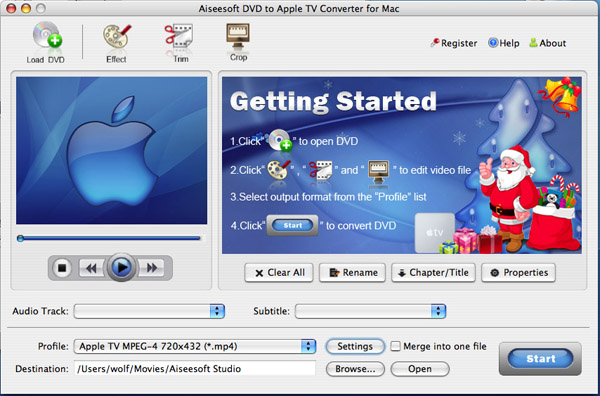
DVD to Apple TV Converter for Mac Guide

Aiseesoft DVD to Apple TV Converter for Mac is a professional easy to use program to convert DVD movies for playback on Apple TV. The following is the step-to-step guide to convert DVD to Apple TV on Mac OS X:

Note:This guide is for mac users, If you use windows, Please see how to convert DVD to Apple TV formats on windows!

You can download the latest version for free form the product page of DVD to Apple TV Converter for Mac, (choose intel version OR PowerPC version according to the processor of your iMac / MacBook / Mac Pro...)

Step 1: Download Aiseesoft DVD Audio Ripper for Mac and install the program.
Click the Load DVD button, browse your computer, find the DVD folder of the movie you want to add from your hard disc or DVD-ROM, open your DVD folder, select the VIDEO_TS folder and click OK.

DVD to Apple TV Converter for Mac - load dvd

After you add your movie, you can choose any titles or chapters that you want to convert by ticking the check boxes before them.

Step 2: Output Settings
At the bottom of the main window, you can name the output file for the current title/chapter, and select a subtitle to put on your movie, select an audio track. Then finish all the settings including selecting an output format, clicking the Settings button to set the video and audio encoding settings, choose if to merge the selected titles or chapters into one file, and set an output directory to save the output files.

Step 3: Start Conversion
After setting the output settings, you can just click the “Start” button to start converting your Movie. You can choose to shut down your computer or open the output folder after conversion so you don't have to sit before your computer waiting for the conversion to finish.

Aiseesoft DVD to Apple TV Converter for mac can also trim, crop videos and capture pictures, these functions are the same as DVD Ripper for MAC. You can learn more from how to edit, crop, trim DVD clips on Mac OS X .

Buy Now (only $25.00)   Download Intel Version    Download PowerPC Version

2010年6月6日星期日

How to convert video to AVI, MPEG, WMV, FLV, MOV, MP4, VOB, MP3,etc

This video products guide is to demonstrate how to convert Video to other video audio files such as (Convert FLV to AVI, AVI to MP4, VOB to AVI,etc) AVI, MP4, AVI, WMV, MOV, MPG, MPEG, 3GP, 3GPP, MPG, ASF, FLV, VOB, WMA, M4A, MP3, etc. and trim, crop, join and edit video.
If you want to convert DVD to and edit DVD movies to your favorite format, you can refer to the guide: How to backup DVD and rip DVD to other video audio files.

The tool you need is Aiseesoft Total Video Converter, which you can download for free from:
http://www.aiseesoft.com/total-video-converter.html

How to convert Video files by using this video converting software? This Guide will show you how to use it step by step easily, and complete the whole converting process perfectly.

How to convert video files with Aiseesoft video converter? Here we go, please following the steps and tips we provide to you:

Part1. How to convert video to AVI, MPEG, WMV, FLV, MOV, MP4, VOB, MP3, etc?
Free download this Aiseesoft Total Video Converter first, install it and start operation; Tips: Click the button of “Add File” to load video files or you can also load the files by clicking the “Files ﹥Add files” on the toolbar.

Total Video Converter - Add Files

Choose the output format
Step1. Choose your file, and click the “Profile” drop-down menu and choose the output format as you.

Total Video Converter - profile

Total Video Converter - Browse

Step3. If you want to complete the conversion by default settings, just click the “Start” button to convert.
It is the easiest way to finish the whole converting process.

Step4. You can select the setting as you wish

Total  Video Converter - settings

Click the “settings” button to open the settings’ window and set output files such as output format and set the video parameters (such as resolution, frame bite, encoder, and bit rate) or audio parameters (such as sample rate, channel, encoder and bit rate, etc.

Next part: How to edit, trim, join and crop video movies?

Free Trial: Download Aiseesoft Total Video Converter

How to Convert AVI to MP3

Download trial version or order full version of this AVI to MP3 Converter and run it on your computer.

How  to convert AVI to MP3

Tutorial for converting AVI to MP3:

1, Load the AVI file

You can click "File" to open the drop-down menu, then select "Add File" to add your AVI sources.

2, Set the output format

Profile: Select an output format – MP3 for the selected file

Settings: You can set video/audio parameters yourself.

Merge into one file: Check this option and the program will join all the added video files into a single one.

Destination: Browse your computer to find a suitable place to save the converted files.

Tip: Want to convert some part of audio from the AVI file? Click the Play button to preview the media file and set the Start Time and the End Time in Trim edit window.

3, Click "Start" to convert

Click "Start" button to convert AVI to MP3.

That's it! It is as easy as a-b-c. Click How to convert AVI to MP3 to know more knowledge involved.

2010年6月4日星期五

Sony Shifts on Open Source

The partnership between Sony Corp. (SNE) and Google Inc. (GOOG) highlights the changes taking place in TV viewing habits, but it is also symbolic of another change: Sony’s stance on open-source technology.

Historically, the knock on Sony has been that it has a blind allegiance to its own proprietary technology. From Betamax to ATRAC, Sony’s compression format which eventually lost out to MP3, the company often paid the price for its NIH (Not Invented Here) Syndrome.

If Sony’s format didn’t become the standard, early Sony adopters were left in the dark. Are there any Digital Audio Tape users out there?

The company, however, seems to have had a change of heart in recent years.

Read the rest of this post on the original site

2010年6月2日星期三

Are Flashy iPad Apps What Publishers Really Need?

Adobe may have been stymied at every turn by Apple (AAPL) and its very public hatred of all things Flash, but that hasn’t stopped the company from pushing its vision of interactive publishing for mobile devices like the iPad. Today, Adobe (ADBE) announced a “digital publishing platform” based on its Creative Suites software that it says will allow any magazine publisher to have a snazzy, interactive app just like the one Wired recently introduced (a preview of which is embedded below).

Read the rest of this post on the original site

2010年6月1日星期二

Q&A: Microsoft’s Bach on His Exit, and Future of the Company

Robbie Bach may have been viewed at one point as a potential successor to Steve Ballmer as Microsoft’s (MSFT) chief executive–but Bach says he never aspired to the job, and he and Ballmer have never discussed it.

That was one of the insights we gleaned from the Microsoft Entertainment & Devices Division president during a wide-ranging interview in conjunction with the news that he’ll be retiring after 22 years with the company. Among other topics, Bach explained why he’s leaving, discussed his post-Microsoft plans, defended the company’s prospects in the mobile phone industry, addressed the canceled Courier project, and described the upcoming Project Natal release as a “midlife kicker” for the Xbox 360 console business.

Read the rest of this post on the original site