2012年1月31日星期二

How to Copy DVD, Rip DVD, Convert Video on Mac

Many friends want to share their home-make DVDs and their DVD movies with others and also they always feel difficult to do that. Today I will share you a really easy way to Copy DVD to another DVD disc, DVD image ISO, or a DVD folder. Also I will also introduce you how to rip DVD and convert videos on Mac.

Part 1: How to copy a DVD to another DVD disc/DVD image ISO/DVD folder on Mac
Step 1: DVD Copy for Mac.
To copy a DVD on Mac, you need a DVD Copy for Mac to help you. Aiseesoft DVD Copy for Mac is a good choice.


Step 2: Load Your Source
This excellent DVD copy for Mac allows you to load DVD folder and DVD image ISO.

Step 3: Choose Output Info
1. “Full Disc” or “Main Movie”
This DVD copy for Mac enables you to copy the full disc and also the main movie according to your need.

2. “Audio”, “Subtitle” and “Volume” name
You can choose your output audio from the “Audio” drop-down list, such as “all audio”/ “None”/ or some audio the DVD provide.

Subtitle is always an important thing, you can choose your output subtitle in “Subtitle” drop-down list.

You can also name your output volume's name

Step 4: Choose Your Target
You can copy your DVD to another DVD disc, DVD folder or DVD image ISO.

Tips:
1. You can also choose to copy the menus or not.
2. All the info you choose will be dispalyed on the “Info Box”.

Part 2: How to rip DVD to video formats on Mac

Step 1: Download Aiseesoft DVD Ripper for Mac

Step 2. Load DVD
Insert DVD into your DVD-ROM, run DVD Ripper for Mac, click “Load DVD”, find the DVD folder of the movie you want to add from your DVD-ROM, and Click “Open”.
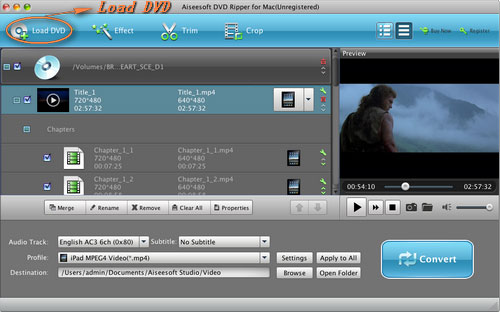


Step 3. Set output format.
This best DVD ripper for Mac provides you output formats as many as you want. Just choose one from the drop down list “profile” according to your portable player.

Step 4: Conversion
You can just Click “Start” to begin your conversion.

Part 3: How to Convert Video files on Mac

Step 1: Download Aiseesoft Video Converter for Mac

Step 2: Load video
Easily click “Add File” to load your video that you want to convert.

Step 3: Choose output profile and settings
At the bottom of the interface there are a drop-download list named “profile”. You can choose your output format here.

Tips:
1. Trim
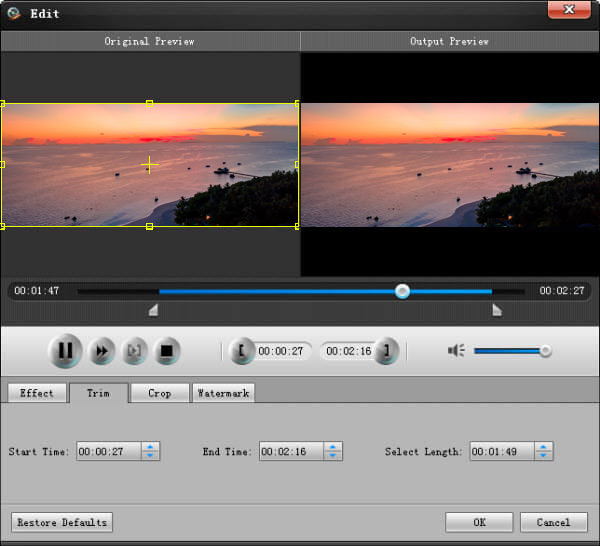
If you want to pick up a part of the video to convert, please click “Trim” button and drag the “Start trim slider” to set the start time and “End trim slider” to set the end time. (a) You can also do that by clicking the “Start trim button” and “End trim button” (b). The third way you do that is set the exact Start/End time at the right of the pop-up window and click “OK”.(c)

2. Crop
If you want to remove the black edges or you want to convert a certain area of your video, please click the “Crop” button. You can do this either by drag the frame around the movie (a) or set the crop value: “Top, Left, Bottom, Right”.(b). Another way to do that is choose models from “Crop Mode”(c).
Aiseesoft Video Converter for Mac also allows you to chose the output aspect ratio above the crop pane, “Keep Original, full screen, 16:9 and 4:3” are available.

3. Effect
If you want to adjust the effect of your movie, please click the “Effect” button and a pop-up effect window will appear. It allows you to edit your movie’s effect including “Brightness, Contrast, Hue, Saturation and Volume”.

2012年1月29日星期日

Foxconn insiders said iPhone 5 will start mass production: equiped with 4 inches screen

If you want to convert DVD files to your iOS devices, you can have a try the DVD to iPad Converter

The American technology blog 9to5Mac reported, a reliable source from China Foxconn said, next iPhone generation called iPhone 5 will start mass production.

The source said, samples have been previously provided to the apple. These differences among the samples is not big, but it is uncertain which samples will be the final production. These samples are common including:

- more than 4 inch screen ( at least one from LG ).

- did not use teardrop shape design. So far all the sample thickness, length and width are symmetrical.

- there is not a similar appearance to iPhone 4 / iPhone 4S.

- has not yet determined which a sample is the final version.

Not long ago, the United States of America technology blog iLounge also reported, the next generation iPhone will not use teardrop appearance, and will use 4 inch display. iPhone4S until last year spring late start mass production. So the iPhone from production to market takes around 5 months, which means that the apple is possible in this summer's Worldwide Developers Conference ( WWDC ) release iPhone 5.

2012年1月28日星期六

RIM CEO: Start Negotiation With Rivals or Authorize BlackBerry System

DVD Ripper for Mac is really powerful for dvd fans.

RIM CEO Thorsten Hein,just has been appointed 5 days, on Friday when accepting media interview,promised, he will lead the company to recover the United States intelligence mobile phone market territory, and has already begun with the intention to use its software rivals authorized negotiations.

Promotion plan

Hayes said, RIM will next week launch a promotion plan to attract consumers to try with a touch screen and a high performance of the latest BlackBerry browser equipment. He said, the promotion also relates to the application.

In the United States market" in order to recover lost territory, we have taken some different measures." He said," I came here to fight, to win."

Hayes is 54 years old, once in the Siemens for 24 years. Because RIM in intelligent mobile phone market behind Apple's iPhone and Google, income also has two consecutive quarter of decline, the stock price dropped 75% over the past year RIM. Hayes mission is to reverse the old intelligent mobile phone giant slide.

Hayes last weekend just before the joint CEO Jim Balsillie ( Jim Balsillie ) and Mike Lazaridis ( Mike Lazaridis ) took the helm, he said, the current a pressing matter of the moment is to restore the BlackBerry in the United States market sales, and to launch next month of the revision of the PlayBook tablet, but this time the introduction of a new generation of BlackBerry 10 operating system.

" This is my first 100 days of the main task. My first task is to promote the BlackBerry 7." Hayes said.

The United States of America errors

Hayes only a few hours of sleep every night, so that day met with the customer, the evening then BlackBerry processing work. He said, RIM needs to enhance the marketing and communication skills, in order to attract the attention of the outside.

The United States of America BlackBerry market sales decline in the first quarter of 45%, even though Indonesia and India and other emerging market income soars, the overall income is affected. According to the United States market research firm Gartner data, the third quarter of 2011 global intelligence Blackberry mobile phone market share fell to 11%, far below the 21% years ago. Old BlackBerry product line can not be in function and application of iPhone and Android quantity competition.

" When the BlackBerry user experience, will focus on a series of elements : battery life, network efficiency, safety and optimal input experience." Hayes said," specific to the American market, we miss the Internet browsing and application of consumer-oriented features."

2012年1月26日星期四

Aiseesoft Updates iPhone Movie Converter (Windows and Mac) -- Supports iPhone 4S

Aiseesoft, a top-ranking Windows and Mac DVD/video converting software provider, has recently updated the iPhone Movie Converter (Windows and Mac) to support the latest iPhone 4S. After this update, Aiseesoft iPhone Video Converter can help users convert any popular video file to iPhone 4S compatible video/audio formats. All old users of this software can get a free update to the newest version.

Aiseesoft iPhone Movie Converter is the most professional iPhone video converting software. It is able to convert all popular video files, like MPEG, VOB, MP4, M4V, TS, RMVB, WMV, MKV, AVI, 3GP, FLV, SWF, MOD, TOD, MOV, HD TS, HD MTS, HD MPEG, HD MP4, HD WMV, HD MOV, HD H.264, HD RM, etc., to iPhone videos, and the output video quality is perfect. Users can conveniently enjoy the wonderful output videos on iPhone.

Apart from the video to iPhone converting feature, this iPhone Video Converter also has powerful video editing features. With it, users can crop video frame, trim video segment, watermark video, adjust video effect, and join video segments together. This amazing function allows users to get a customized output iPhone video.

This iPhone Video Converter is highly compatible with all iPhone versions (iPhone, iPhone 3G, iPhone 3GS, iPhone 4, and iPhone 4S). Moreover, this software supports iPod, iPod touch, iPad, and iPad 2.

Aiseesoft iPhone Video Converter is available for both Windows and Mac versions. It is definitely the perfect assistant tool to help customers enjoy any video file on iPhone (iPhone 4S).

For Windows users, please visit: http://www.aiseesoft.com/iphone-movie-converter.html

For Mac users, please visit: http://www.aiseesoft.com/iphone-video-converter-for-mac.html

For Mac users, Aiseesoft has also prepared another iPhone 4S assistant software – Video Converter for Mac, which can convert all video files to iPhone 4S and other popular portable device files on Mac.

System Requirements for Windows Version
OS Supported: Windows NT4/2000/2003/XP and Windows Vista, Windows 7
Hardware Requirements: 800MHz Intel or AMD CPU, or above; 512MB RAM or more

System Requirements for Mac Version
OS Supported: Mac OS X v10.4 – v10.7
Hardware Requirements: 512MB RAM, Super VGA (800×600) resolution, 16-bit graphics card or higher

About Aiseesoft Studio

As a professional multimedia software provider, Aiseesoft Studio is dedicated to developing the best multimedia desktop applications to help Windows and Mac users smoothly convert, edit and transfer various video/audio files. In order to meet users' various requirements, Aiseesoft Studio constantly brings in new ideas, technologies, etc.

2012年1月20日星期五

How to convert WMV to MP4 for Kindle Fire?

The Amazon Kindle Fire is the popular small tablet that average users can pick up and immediately use, with a simple, clear interface. Then with the ultra-affordable price and the screen quality, it's open enough to attract geeks, too. While the Kindle Fire can only support MP4 and VP8 video formats, if you want to put WMV video on the Kindle Fire, you need to convert the WMV to MP4 and then play it on your Kindle Fire with the WMV to Kindle Fire MP4 Converter.

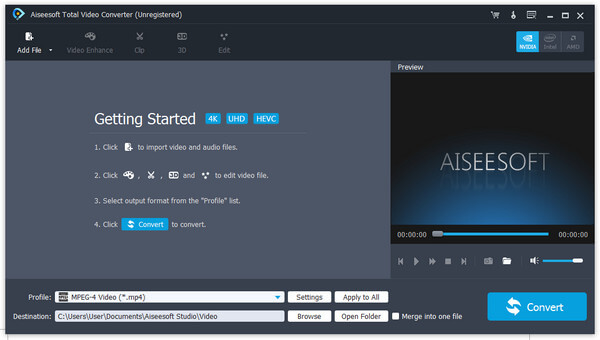
Aiseesoft Total Video Converter is the versatile and user-friendly WMV to Kindle Fire MP4 Converter software for you, which has the ability to convert WMV video to MP4 for Kindle Fire with amazing speed and excellent quality. Now, the following guide offers a solution on how to convert WMV to MP4 for Kindle Fire with Aiseesoft Total Video Converter.

Step 1: Download and install WMV to Kindle Fire MP4 Converter

You can free download Aiseesoft Total Video Converter and then install it on your computer. After running the application, you will see the interface as bellow.

Kindle Fire Video Converter

Step 2: Add video file

There are three ways to add video file, you can click "Add Video" button, or click "File" menu on the main interface to add the video file. Also you can just drag and drop your video file to the WMV to Kindle Fire MP4 Converter.

Step 3: Choose output format

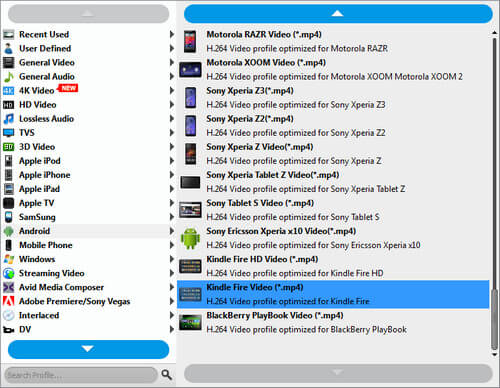
Click the "Profile" drop-down list to choose the proper output format according to your Kindle Fire. You can select "General Video” > “MPEG-4 Video (*.mp4)” as the output format.

set output format

Step 4: Customize output settings

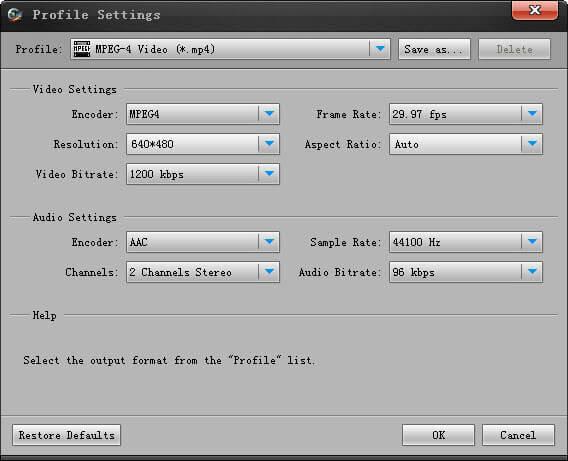
You can customize output settings, such as Video Bitrate, Encoder, Frame Rate, Resolution, Aspect Ratio and Audio Bitrate, Encoder, Channel, Sample Rate for your Kindle Fire by clicking the "Settings" button.

set output parameters

Step 5: Define destination folder

Click the "Browse" button to define the file folder to put the output video file. After finishing these processes, you can click “Convert” button to start converting.

iPad to Mac iPhone Transfer

How to convert video to Kindle Fire?

Amazon Kindle Fire provides you access to the vast library of music, videos, documents, apps and many other products, so you are never going to regret for the availability to content. And it offers Amazon’s silk cloud facility which offers you an unlimited space to use, so there is no issue with the storage capacity of the Kindle. While with the limited supporting formats of the Kindle Fire, we can only put the MP4 and VP8 videos on the Kindle Fire directly, if you want to enjoy video to Kindle Fire, you need to use the Kindle Fire Video Converter to convert all videos to Kindle Fire compatible formats.

Aiseesoft Kindle Fire Video Converter has the excellent converting function to convert all kinds of videos like MKV, WMV, AVI, H.264/MPEG-4 AVC, FLV, 3GP, DivX, VOB and HD videos etc. to your Kindle Fire with amazing speed and excellent quality. Now, the following guide offers a solution on how to convert video to Kindle Fire with Aiseesoft Total Video Converter.

Step 1: Download and install Kindle Fire Video Converter

You can free download Aiseesoft Total Video Converter and then install it on your computer. After running the application, you will see the interface as bellow.

Kindle Fire Video Converter

Step 2: Input video file

There are three ways to input video file, you can click "Add Video" button, or click "File" menu on the main interface to add the video file. Also you can just drag and drop your video file to the Kindle Fire Video Converter.

Step 3: Choose output format

Click the “Profile” drop-down list to select the output format for the output video file. You can choose “General Video” > “MPEG-4 Video (*.mp4)” as the output format from the drop list of Profile. You can customize output settings (Encoder, Frame Rate, Resolution, Aspect Ratio and Bitrate) for your Kindle Fire by clicking the "Settings" button.

set output format

Step 4: Customize video effect

This Kindle Fire Video Converter provides users with powerful video editing features. If you are not satisfied with the original video effect, you can cut off any video clips, crop video frame, add text/image watermark, adjust video brightness, saturation, contrast, hue and volume, and so on. All these editing processes can be finished in the "Edit" interface.

 customize video length

Step 5: Start converting video to Kindle Fire

Now click the “Convert” button to convert video to the Kindle Fire. Just a few minutes, the whole converting process will be finished and then you can play any videos on your lovely Kindle Fire at will.

iPhone to Mac, Blu ray ripper

iBooks 2 and iBooks Author will enrich your life

For converting video files, you can use the Total Video Converter

Apple made a number of education-related announcements on Thursday in New York City that make it clear the company is serious about dominating textbooks, like it did with music and apps. Apple jumped deeper into the education space with the launch of iBooks 2 for textbooks, a textbook software program that allows textbook-makers and instructors to create rich, interactive teaching media for the iPad, a custom e-book creation platform dubbed iBooks Author, and an expanded iTunes U app that's also now accessible to K-12 educators.

"iBooks" are no longer old Apple laptops made out of white plastic, nor are they simply e-books to be purchased within Apple's iBookstore. The announcement is akin to "GarageBand for e-books," giving authors access to easy-to-use tools on the computer in order to create multimedia content for the iPad. The iBooks (version 2) format is an improved format created by Apple based on ePub 3, but with additions and changes specific to Apple. iBooks textbooks can include animations, diagrams, photos, videos and amazing navigation. In addition, they allow readers to highlight passages, add notes and even test themselves with flashcards built from their own notes or from the index. Most educational titles on the iBookstore are priced at $14.99 (or less) and launch partners include textbook heavyweights Houghton Mifflin Harcourt, McGraw-Hill and Pearson.

iBooks Author allows anyone to create interactive iBooks with text, video, images and more. As Apple mentioned during their media event, the availability of such a robust tool to make electronic books has been lacking. And iBook Author can export projects in a number of different formats, including iBook format, PDF and text. These additions are believed to add new functionality and interactivity to the format as shown during today's media event. "If you've ever been involved with creating e-books before, you know this is a total miracle in terms of time savings," Apple told the audience in NYC. Major publishers, however, are not the only ones who can create e-textbooks. A new Mac App Store app, iBooks Author, allows educators and smaller publishers to create their own books for inclusion in the iBookstore. That can be a textbook, cookbook, history book, or more. Text and images can be added by dragging and dropping, while movies, interactive photo galleries, Keynote presentations, and more can be included via Multi-Touch widgets.

Apple also announced plans to expand beyond the college level, offering the iTunes U app to K-12 educators. "The all-new iTunes U app enables students anywhere to tap into entire courses from the world's most prestigious universities," said Eddy Cue, Apple's senior vice president of Internet Software and Services. All three of the apps discussed in Thursday's announcement—iBooks 2, iBooks Author, and iTunes U—are free to download from their respective app stores. Apple clearly wants to make the effort accessible to everyone, including instructors.

2012年1月19日星期四

Kodak Applied for bankruptcy protection in New York

For Converting formats between HD and SD, you can using this MTS Converter

Kodak announced Thursday, Kodak and the United States subsidiaries had filed for bankruptcy protection. Kodak said, it is to strengthen its United States and overseas liquidity, the strategy of intellectual property monetization, properly resolve the remaining debt problems, and enabled the company to focus on the most valuable business. The company will continue to pay staff salary and welfare as well as development consumer oriented services.

In 1936 the company produced the " Kodak Bantam ( Bantam Special )" camera, which is the first portable camera. It is designed by the earliest occupation American industrial designer Walter Teague.

Kodak gold is at the end of the era of classic products. " Strong popularity, quality superior, in tourism, wedding, or a family party can easily take great pictures, this is Kodak gold KodakGold film target. The Kodak gold series of films, including four different light and speed type colour negatives: Kodak gold 100, Kodak, Kodak gold 200 and easily beat gold 400, each have distinguishing feature."

Kodak CEO Antonio Perez announced the sale of the company in July 1100 patents, involved in image processing, edit and store. Peng Andong Kodak in 2005 at the helm, he arranged Kodak business focus localization on the printing services, in order to help the company to revive. However, Kodak sales performance more than 2005 years half, last year was $7200000000. Today bright two years are expected to continue to shrink. In 2008 the company to lose more than $1760000000.

In 1880 by the founder of Mr. George Eastman Kodak, 8 years later in 1888 launched the " Kodak" camera. The founder of the inspiration of onomatopoeic words are the shutter down, now is the world's most famous one of the trademarks of. By digital image technique, Kodak has abandoned the traditional professional photography and film services, into a complete consumption enterprises.

2012年1月18日星期三

Aiseesoft Releases a New DVD Ripper with Wonderful New Features

As the best and most amazing DVD ripping software, Aiseesoft DVD Ripper provides the best solution to help users enjoy popular DVD movies on computers and portable devices. Now Aiseesoft has introduced a major update to this amazing software. For instance, the DVD loading speed and the accuracy of the identification of the main movie have been improved.

After this major update, this professional DVD Converter can bring users a much better user experience. With this software, users can easily rip any DVD to most popular video files (MP4, H.264, AVI, WMV, FLV, MKV, 3GP, VOB, DivX, MOV, DPG, HD H.264, HD AVI, HD MPG, HD TS, HD WMV, HD MPEG 4, HD MOV, HD ASF, etc.). And the output video quality is perfect. Then users can enjoy any interesting video on iPad, iPhone (iPhone 4S), iPod touch, Android devices, PSP and BlackBerry, etc., without any limitation of DVD drive.

Besides the basic converting feature, this software also possesses powerful video editing features. Users are allowed to trim video length, crop video frames, watermark video, join videos together, and adjust output video effects. Then users can create a customized output video file.

This DVD ripping software supports AMD APP and NVIDIA-CUDA GPU processing acceleration technology, which can make the DVD ripping process much faster. It can help customers save a lot of time.

Aiseesoft DVD Ripper is one of the most wonderful DVD ripping software to help users enjoy DVD to portable devices.

System Requirements

OS Supported: Windows NT4/2000/2003/XP and Windows Vista, Windows 7
Hardware Requirements: 800MHz Intel or AMD CPU, or above; 512MB RAM or more

About Aiseesoft Studio

As a professional multimedia software provider, Aiseesoft Studio is dedicated to developing the best multimedia desktop applications to help the Windows and Mac users smoothly convert, edit and transfer various video/audio files. In order to meet users' various requirements, Aiseesoft Studio constantly brings in new ideas, technologies, etc.

2012年1月16日星期一

How to transfer music between iPod and Mac without iTunes

Most iPod users are not very good at using iTunes. It is very difficult to use, and you can not transfer your songs back to your computer when your computer crashed down, if it is not purchased from Apple Store. So I had not used iTunes for a long time on my Mac since I found Aiseesoft iPod to Mac Transfer

It can both backup your iPod songs, movie/video and image on your Mac and import your local files to your iPod anytime without worrying loosing other info.
This article aims to show Mac users how to import files to iPod without iTunes and backup iPod info on Mac.

Part 1: How to import songs/video/movie/image to iPod without iTunes. (Take put songs for example)
Step 1: Download and run Aiseesoft iPod Manager for Mac.

For Intel: http://www.aiseesoft.com/downloads/mac/ipod-manager-for-mac.dmg
For Power PC: http://www.aiseesoft.com/downloads/mac/ipod-manager-for-mac.dmg

Step 2: Plug your iPod to your Mac
Aiseesoft iPod Manager for Mac can find it automatically.

Step 3: Pick up the files you want to put on your iPod
1. Click “Music”
2. Click “Mac to iPod” and pick up the songs on your Mac you want to put on your iPod and click “Open”

Few seconds later, it will on your iPod.
(If you want to put video/image, just click “Video”/“Picture” and other operation is the same as putting songs)

Part 2: How to backup iPod info on Mac
Step 1: Plug your iPod to your Mac
Aiseesoft iPod Manager for Mac can find it automatically.

Step 2: Pick up what you want to backup
Just click Music and all of your music on your iPod will be listed, so you can pick up which songs you want to transfer. (Click “Video”/“Picture”, if you want to backup your videos and image.)

Step 3: Click “iPod to Mac” and find where to put your iPod info on your Mac and click “Open”

Few seconds later, your iPod songs will be on your Mac.

2012年1月15日星期日

Aiseesoft's Best Assistant for Mac Users to Convert TS/MTS/M2TS Files

TS was designed for broadcast. Later it was adapted to digital cameras, recorders and players, which is called M2TS. No matter TS, M2TS or MTS files, there are only specific players and methods to play them. If you want to play them on some other devices, you need to change them to other formats. TS Converter is the best assistant for converting TS files, while MTS Converter and M2TS Converter are designed for MTS and M2TS files. Moreover, the Mac Version is the best choice for Mac users.

Aiseesoft TS Converter for Mac, a powerful Mac TS Converter, is able to help users to convert TS to AVI, MP4, MPEG, MOV, WMV, FLV, etc, or convert TS to iPod, iPhone, Apple TV, PSP. In addition, it not only supports TS file as input format, but also allows users to add MTS, M2TS, TOD, MOD, MP4, 3GP, WMV, AVI, HD video, or convert other videos to TS files. Video editing functions are also provided by this versatile TS Converter for Mac.

MTS Converter for Mac can convert popular MTS videos to all mainstream video formats. And this best Mac MTS Converter can also convert MTS files to those formats supported by different devices such as iPod, iPhone, Apple TV, PSP, Zune, Creative Zen Vision, Archos, iRiver, HP iPAQ, General Pocket PC, and Mobile Phone.

M2TS Converter for Mac aims to convert M2TS video to MPEG, AVI, DivX, VOB, MOV, MKV, FLV, WMV, MP4 etc. and extract audio from M2TS video on Mac for play on iPod, iPhone, PSP, PS3, Creative Zen, Zune, and other portable players.

Whichever you choose, it never lets you down. Download one for free and try it yourself.

System Requirements

Processor: Intel® processor
OS Supported: Mac OS X 10.4 or above
Hardware Requirements: 512MB RAM, Super VGA (800×600) resolution, 16-bit graphics card or higher

2012年1月13日星期五

How to Copy DVD/ISO image/DVD Folder to DVD/ISO image/DVD Folder for Windows/Mac

When you have bunches of DVD movies, it is really hard to take care of them. The disc is really easy to break. So make a copy of your DVD movies to another DVD disc or ISO image or DVD Folder. How?
When you have bunches of DVD movies, your friends must come and borrow your movies to watch. How to protect your movie disc from being broken? Borrow them a copy?
How?
When your family have a party and it is really sweet, everyone wants to have a copy of the party's video. But they make only one DVD of it. How to make everyone has the record of the happy time? Copy the DVD.
How?

These problems are easy to solve now, if you have this powerful DVD Copy Software.
It can help you to make copys of your DVD. If you want to backup your DVD movies, you can choose to copy the full disc or the main movie. It can also copy a DVD to ISO image and DVD Folder on your computer. Also it can copy your ISO image or DVD Folder to a DVD disc to play in DVD player.

Here is a simple guide for you to follow:
For Windows users:

Step 1 Choose Source:
The source of this DVD copy software can be:
1: DVD disc
2: ISO image
3: DVD Folder
Tip 1: The specific information of the DVD disc will be shown on the top-left of the interface.

Step 2. Preparation
Before you click the “Start” button,
1. You can choose to copy the full disc or the main movie.
2. You can choose the audio, subtitle of the copy.
3. You can change the name of the volume.
4. You can choose to “include menu” or “skip menu” or neither of them.

Step 3. Choose Target:
You can save your DVD movie as:
1: DVD disc
2: DVD Folder
3: ISO Image File

Step 4: Start Copy

Click “Start” button to start the copy.

Tip 2:
You can change the “Preference”, when you click “Edit” button.

For Mac users:

This DVD Copy for Mac software is the best DVD copy for Mac users.
Let's begin to copy DVDs:
Step 1: Download and install DVD Copy for Mac

Step 2: Load Your Source
This excellent DVD copy for Mac allows you to load DVD folder and DVD image ISO.

Step 3: Choose Output Info
1. “Full Disc” or “Main Movie”
This DVD copy for Mac enables you to copy the full disc and also the main movie according to your need.

2. “Audio”, “Subtitle” and “Volume” name
You can choose your output audio from the “Audio” drop-down list, such as “all audio”/ “None”/ or some audio the DVD provide.

Subtitle is always an important thing, you can choose your output subtitle in “Subtitle” drop-down list.

You can also name your output volume's name

Step 4: Choose Your Target
You can copy your DVD to another DVD disc, DVD folder or DVD image ISO.

Tips:
1. You can also choose to copy the menus or not.
2. All the info you choose will be displayed on the “Info Box”.

2012年1月12日星期四

Lenovo releases ideaTV, which coming to the Chinese Market in April

Thanks for iPad Converter sharing this article.

On January 9, Lenovo released the first smart TV - ideaTV at CES, which marked the official involved in the television industry. Lenovo said that smart TV like a PC from a performance perspective, think of can be found on the advantages of the smart TV. As the world's second-largest personal computer maker, Lenovo announced to enter the mobile Internet market a year ago, to go into smart phones, and now entered the field of smart television. Currently, the U.S. Apple Inc. and Google Inc. are actively seeking to enter the field of smart television.

Lenovo indicated that the association innovation cycle is two years, basically can promote the big innovative every two years product. “in 2010 we participate when CES promoted the first section to be situated between the plate computer and the notebook mix construction product, the outside has given the very high appraisal to us, the related product has also won many big prizes, this we also hugged are anticipating very high.”   

In the ideaTV home page, the tradition television program, the online selection and broadcast video frequency and Internet application, the association calls it “the sandwich” surface. Through remote control's glide button, the user may cut in these three big core functions. It is reported that will recommend the content real-time to push the smart television contact surface popularly through the high in the clouds, and will present directly in the home page to choose.
   
Smart television has other very more importantly content. Reporter saw that associated in the television built-in has applied the store; the user may in apply in the store to find applications and game and so on. The association smart television embarked the newest Android4.0 operating system. The exploiter based on Android has been possible for the association smart television development application. Moreover, in March, 2011, associates with Shanghai hundred regards passes the joint capital establishment “to regard the cloud network science and technology” the Limited company, is the capacity for alcohol high clear legal copy online video frequency resources which especially the ideaTV user provides has custom-made. The association indicated that the association smart television will start to sell in April, at present in the Chinese market, does not promote in the overseas market temporarily.  
 
The Chinese market is the association profit supreme headquarters, at present associates the smart handset also only in the Chinese market sale, the association plan obtains the success after the Chinese market again seeks the international market sale. However the smart television market to the association is a brand-new challenge, the Chinese color television market competition is intense, in addition government to housing market regulation, house turnover drop immediate influence to color television sale.

The association makes the smart television be able to make the personal computing to seek to own superiority, the smart television is also equally likely a very big market, the association was determined steps in this market, but the smart television industry is a long-term goal, does not seek after in the short-term to obtain the success.

2012年1月10日星期二

Aiseesoft Releases the iPad Converter Suite for Mac Platinum for Mac Users

To bring users a more powerful iPad assistant software product on Mac, Aiseesoft releases this iPad Converter for Mac Platinum for all iPad users. Packed with iPad Video Converter for Mac, DVD to iPad Converter for Mac, and Mac iPad Manager Platinum, this Mac iPad software can help users enjoy most popular video files on Mac and manage iPad files on Mac.

Aiseesoft Mac iPad Converter Suite Platinum is able to convert all common DVD and video files to iPad compatible formats on Mac with outstanding output video quality and amazing converting speed. Also this Mac software owns powerful video editing features. Users can customize output iPad video effect. For example, users can trim video length, crop video frame, add watermark to the video, and even adjust video brightness/saturation/contrast/hue.

The built-in Mac iPad Manager Platinum is a powerful iPad file transferring application. It can add local music, movies, eBooks and pictures to iPad for enjoyment. Also this software enables users to export iPad music, movies, pictures, TV shows, podcasts, iTunes U, eBooks, camera rolls, voice memos, camera shots, etc. to Mac, iTunes and even other iPad/iPhone/iPod devices. With this amazing Mac iPad Transfer Platinum, customers can easily manage iPad files on Mac.

Besides iPad, this iPad Manager Platinum for Mac also supports other Apple portable devices (iPad, iPhone and iPod), and it is highly compatible the new iOS 5. This software can transfer iPhone SMS (MMS) and Contacts to Mac and backup this info in this program. Moreover, users can create the unique iPhone M4R ringtones with any source DVD, video and audio file.

This iPad Converter Suite for Mac Platinum is one of the best iPad mates to help users convert DVD/video to iPad and transfer iPad files on Mac.

System Requirements for Mac Version

OS Supported: Mac OS X v10.4 – v10.7

Hardware Requirements: 512MB RAM, Super VGA (800×600) resolution, 16-bit graphics card or higher

About Aiseesoft Studio

As a professional multimedia software provider, Aiseesoft Studio is dedicated to developing the best multimedia desktop applications to help the Windows and Mac users smoothly convert, edit and transfer various video/audio files. In order to meet users' various requirements, Aiseesoft Studio constantly brings in new ideas, technologies, etc.

If you are Windows user, you can choose iPad Converter.

2012年1月9日星期一

Aiseesoft's Best Assistant for Mac Users to Convert TS/MTS/M2TS Files

TS was designed for broadcast. Later it was adapted to digital cameras, recorders and players, which is called M2TS. No matter TS, M2TS or MTS files, there are only specific players and methods to play them. If you want to play them on some other devices, you need to change them to other formats. TS Converter is the best assistant for converting TS files, while MTS Converter and M2TS Converter are designed for MTS and M2TS files. Moreover, the Mac Version is the best choice for Mac users.

Aiseesoft TS Converter for Mac, a powerful Mac TS Converter, is able to help users to convert TS to AVI, MP4, MPEG, MOV, WMV, FLV, etc, or convert TS to iPod, iPhone, Apple TV, PSP. In addition, it not only supports TS file as input format, but also allows users to add MTS, M2TS, TOD, MOD, MP4, 3GP, WMV, AVI, HD video, or convert other videos to TS files. Video editing functions are also provided by this versatile TS Converter for Mac.

MTS Converter for Mac can convert popular MTS videos to all mainstream video formats. And this best Mac MTS Converter can also convert MTS files to those formats supported by different devices such as iPod, iPhone, Apple TV, PSP, Zune, Creative Zen Vision, Archos, iRiver, HP iPAQ, General Pocket PC, and Mobile Phone.

M2TS Converter for Mac aims to convert M2TS video to MPEG, AVI, DivX, VOB, MOV, MKV, FLV, WMV, MP4 etc. and extract audio from M2TS video on Mac for play on iPod, iPhone, PSP, PS3, Creative Zen, Zune, and other portable players.

Whichever you choose, it never lets you down. Download one for free and try it yourself.

System Requirements

Processor: Intel® processor
OS Supported: Mac OS X 10.4 or above
Hardware Requirements: 512MB RAM, Super VGA (800×600) resolution, 16-bit graphics card or higher

2012年1月8日星期日

Diablo 3 will be held at 00:00 a.m in February 1, 2012?

Thanks for DVD Ripper for Mac Club posting this article.

Yesterday a game player in the famous shopping malls BestBuy found the Diablo 3 sale poster, which clearly written Diablo 3 will start selling at 00:00 a.m in February 1, 2012. At the same time in the poster below are also digital countdown "Ancient evils of the past reawaken in xxxxx"! Wait patiently, start the countdown!

Thus a message will certainly cause great sensation, so many game players began looking for official channels to verify it, Bashiok, just returned from a holiday in Canada is clearly the best candidate. from the reply of Bashiok, this is just a means by the sale business. The following is the latest twitter records: ( the following twitter records are according to the sequence of events in the development of new record, the longer, the fresher! )

@ koevii: you should make best buy know if the time is not really what will happen ... ... Unless I missed something ... ..

@ Bashiok: we cannot guarantee that retailers are not fake date!

@ koevii: Okay, but on their forum, website has no up. I have to admit that waiting for such a long time first so excited.

@ Bashiok: retailer in the official release date was not aware of any date.

@ koevii: I know. Thank you to clarify this prediction, I must be so insane.

@ Bashiok: all right, I don't mind. I have seen more than the poor prediction. );

广告海报

2012年1月6日星期五

Sprint will launch 4G LTE, and Galaxy Nexus plans to run it

Sprint Nextel is looking to get its 4G LTE rolled out sooner, rather than later. Sprint plans to launch its 4G LTE service, part of its Network Vision upgrade plan, in 10 markets by the first half of this year. That includes major cities including Dallas (AT&T's headquarters), San Antonio, Houston, and Atlanta. Those cities are expected to be the first to get LTE (Long-Term Evolution), CEO Dan Hesse announced at the Citigroup Entertainment, Media and Telecommunications Conference in San Francisco, Sprint said.

The initial rollouts would put Sprint right in the face of AT&T, which it has bitterly fought over the latter's failed bid to acquire T-Mobile USA. AT&T is based in Dallas, and its wireless arm, AT&T Mobility, operates out of Atlanta. Customers, however, may not be able to take advantage of that network. Sprint previously said that 4G LTE devices wouldn't come until the second half of the year. The news comes as AT&T also announced that it has expanded its own LTE network to 11 additional markets, including major cities such as Los Angeles, New York, and San Francisco. Verizon Wireless, however, still holds a considerable lead on LTE coverage.

Sprint plans to finish building its own 4G LTE network by 2013. In the meantime, the company said it would continue to support WiMax devices through this year. Clearwire is working to switch over to its own version of LTE as well. Hesse said that by 2014, he hopes to get Federal Communications Commission approval to use some of its current stock of spectrum for the LTE network, and is looking increase capacity in the next two years. Sprint and LightSquared have a network-sharing deal in which Sprint would host LightSquared's spectrum on its infrastructure in exchange for money and spectrum.
Sprint appears ready to feature the Galaxy Nexus on its own network, if an ad featuring the phone is to be believed. Several blogs noted that Sprint had apparently begun advertising the phone on CNET, just shortly after Sprint chief executive Dan Hesse announced the company's LTE plans that will roll out during the middle of the year.

We've reached out to Sprint and will be updating this post as we learn more, but here's what's true should the ad prove legitimate: We're looking at a familiar 4.65-inch HD Super AMOLED display, Android 4.0, a 1080p movie mode, front and rear cameras, and a 1.5GHz dual-core processor. Beyond that, there's the question of Sprint's unlimited stance -- the operator's been holding firm to date, but it'll surely become harder to justify a "truly unlimited" option when its Smartphone base starts flocking to handsets like these.
The Galaxy Nexus could conceivably be one of the devices Sprint announces at CES. While the company doesn't have a press conference scheduled at the event, it is expected to make some announcements on Monday. Such a device would help with AT&T and Verizon Wireless preparing their onslaught of 4G LTE device launches.

Verizon Wireless previously said a vast majority of its Smartphone would be 4G LTE, and AT&T has been quickly bulking up its own 4G LTE portfolio after launching the network earlier this year.

Thanks for DVD Converter delivering this article.

2012年1月5日星期四

Wintel Alliance Decides to Stage a comeback straggling apple

The nearly broken Wintel League under attack of Apple once again to fight back. News from yesterday show, Intel plans to launch a new CPU tablet computer with Microsoft next generation Windows 8 operating system for mobile terminal market in the second half of this year.

Another message shows, the Wintel alliance is expected to stage a comeback with Lenovo, Acer, Acer hardware manufacturers to launch tablet PC based on that framework combined with straggling apple in the three quarters.

The signal that Intel released indicates, the so-called Clover Trail processor will be dedicated to the larger screen size flat panel computer like mobile devices, and the design center is based on Microsoft's next-generation operating system Windows 8. Analysts said the Wintel alliance, new architecture with hardware manufacturers associated with other tablet computers like Lenovo accelerated listed. What most directly affected by the impact is Apple's iPad market share.

In fact, both Intel and Microsoft are the losers in mobile application times. ARM occupied 90% of the mobile CPU market share. While Microsoft's mobile operating system before the apple iOS and Google Android almost did no contribution. News and comments come that Wintel alliance in the field of PC for nearly 30 years may thus step to rupture.

Thanks for author DVD to iPad 2 Converter Club delivering the message.

2012年1月4日星期三

Apple is planning iBook Event in NYC in January

According to a report by All Things Digital published Monday, Apple is planning a media event in New York to make a "media-related," not hardware-related announcement.

Further, sources for TechCrunch claimed the announcement will focus on "improvements to the iBooks platform," and the event will supposedly be more geared towards the publishing industry (not necessarily consumers). Per the usual caveat, the tech giant is well known for moving around their public show-and-tells, so this could certainly change at any moment.

Apple execs—possibly Eddy Cue, senior vice president of Internet software and services—will host an "important" but not huge event by month's end, which will involve a media-related announcement.

"It's a media-related event of some sort," said Zeus Kerravala, an analyst with ZK Research. "And it looks like it will be something about books and magazines, about iBooks. The fact that it's going to take place in New York City gives that away." New York, while not the heart of the U.S.'s technology industry, remains the center of publishing in the country. Several reports have surfaced concerning a possible Apple event in January, including those by All Things Digital, TechCrunch and others. Several of those reports have pinpointed iBooks as a likely focus. The Apple rumors are, of course, in full swing as we open 2012. But much of those reports have focused on products like the iPad 3 and the fabled Apple TV set. Apple product launches usually happen at its Cupertino headquarters or a larger venue in San Francisco like the Moscone Center.

Apple has recently highlighted the ability of its iBooks platform to include sound, video, and other features by offering a free eBook of The Yellow Submarine. We believe the announcement could likely involve support for the EPUB 3 standard, which enables a wider variety of multimedia and interaction features. Amazon recently announced its own similarly improved eBook standard using HTML5 and CSS3.

Several authors have also told that they long for tools to help transform book text into standards-compliant eBooks. The opportunity certainly seems ripe for Apple to offer such a tool. If Apple created software that could generate standards-compliant EPUB files, it could be a boon to both the publishing industry and independent authors alike.

Also unlikely, the rollout of Apple’s large-scale rethinking of the interactive television initiative that it has been working on. While the company is expected to launch a new Apple TV product later in 2012, such an event would almost certainly be held in the heart of the industry in Hollywood or at least in Silicon Valley.

That leaves some kind of advertising or even publishing announcement, which might be the case, since Apple SVP of Internet Software and Services Eddy Cue is reportedly involved. Apple also declined to comment on the rumored New York City event. However, Apple would hold its iPhone event on Oct. 4 and that it was moved from San Francisco to Apple's campus, so stay tuned.

Thanks for DVD to iPad Club delivering this article.

2012年1月1日星期日

Watch any DVD/Video on Mobile Phone with Aiseesoft DVD Converter Suite

With more and more portable devices appearing, you can easily enjoy your favorite movies and music and manage some files with them anytime and anywhere. However, there are still some limitations such as, some video formats are incompatible with your device or won't play DVD movies without a DVD drive. Putting any format of file on your mobile phone and watching DVD movies without a DVD player can now be achieved with a powerful DVD and video conversion pack tool - DVD Converter Suite.

Why do you need to choose this DVD Converter Suite? That's because it is a perfect combination of DVD Ripper, Video Converter and iPod to Computer Transfer. Exactly speaking, it integrates functions of the three software - converts DVDs and video to all the popular formats: MP4, H.264, AVI, MP3, WMV, WMA, FLV, MKV, 3GP, VOB, DivX, MOV, M4A, AAC, WAV, etc., extracts audio from DVD movies or video files, and, also, it is able to transfer movies, songs and photos from iPod to PC for backup. It also supports almost all popular portable players.

In order to make sure you get the most ideal video effects, it allows you to edit output video, such as, trim video length, crop video size to fit for your device, merge several interesting video/audio clips into a whole file, add text or picture watermarks and so forth.

With the help of this DVD Converter Suite, you never need to feel frustrated that you can't enjoy a DVD or some incompatible video. DVD Converter Suite will be your best choice. It really can bring you a wonderful audio-visual feast.

Never hesitate! Freely download this versatile DVD Converter Suite and begin your fantastic digital life now!

Price and Availability
Aiseesoft DVD Converter Suite is now priced at $ 39.00

System Requirements
OS Supported: Windows NT4/2000/2003/XP and Windows Vista, Windows 7
Hardware Requirements: 800MHz Intel or AMD CPU, or above; 512MB RAM or more